Active Directory
Making the Active Directory Diagrams is always better with the Active Directory Diagrams solution, developed by the specialists of CS Odessa for simplifying all the ConceptDraw DIAGRAM users’ work by making it much simpler to create the needed drawing.

Example 1. Active Directory Diagram — Asymmetric Encryption
A directory service that Microsoft developed especially for the Windows domain networks was called as an Active Directory, being included in most of the Windows Server operating systems. It is represented as a set of the different services and processes being in charge of the so-called centralized domain management.
The Active Directory Domain Services (also known as the “AD DS”) were used for a server named as a “domain controller” authenticating as well as authorizing both users and computers in a Windows domain type network. It has been enforcing and assigning the security policies for all the computers and updating and installing software.
For instance, once some user logs into any computer that is known to be a part of a Windows domain, any Active Directory checks the submitted password, determining whether the user is a normal one or a system administrator. It also allows a storage of information and its management, provides authorization and authentication mechanisms, establishing a framework for deploying other related services, such Certificate Services, Lightweight Directory Services, Rights Management Services and Federated Services.
Active Directory is known to be using the so-called “Lightweight Directory Access Protocol” versions 3 and 2, Microsoft's version of Kerberos, and DNS. DNS is one of the Domain Name Systems that is known to be a hierarchical decentralized naming one used for services, computers, or other resources that are connected to the Internet or a private network.
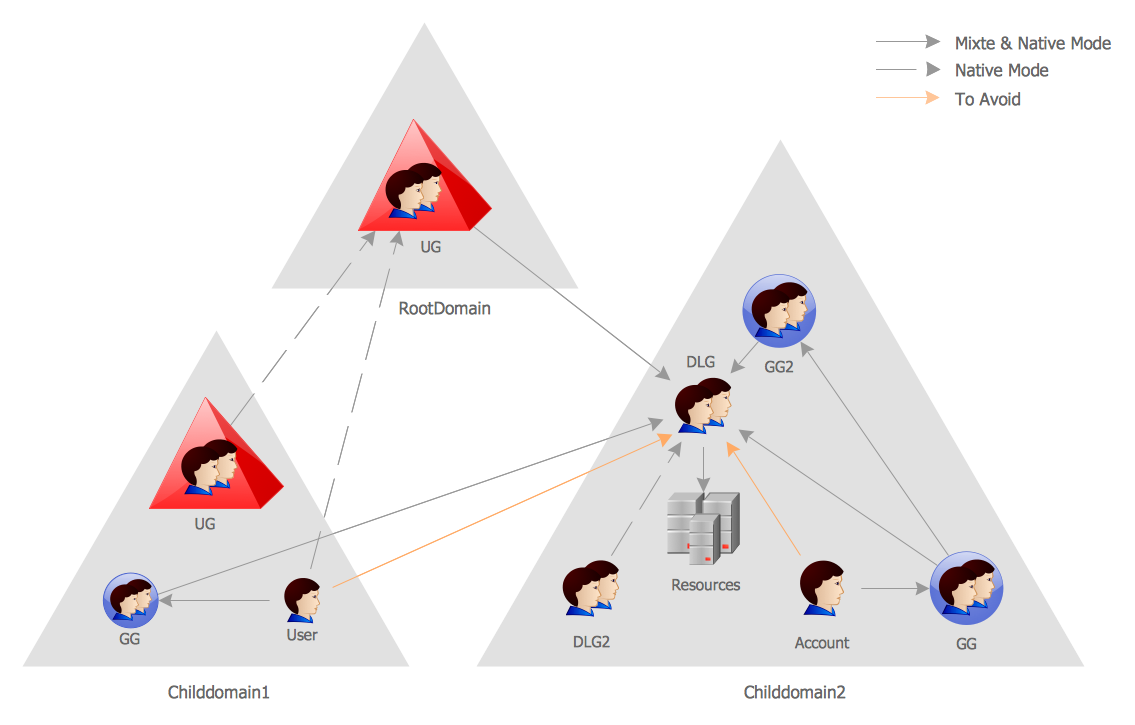
Example 2. Active Directory Diagram — Tree and Forest
Associating different information with the domain names that were previously assigned to each of the participating entities, DNS translates the readily memorized domain names to the numerical IP addresses that are needed for both identifying as well as locating different computer devices and services with the underlying network protocols. By providing a worldwide, the Domain Name System is simply an essential component of the functionality on the Internet, being in use since 1985.
A network that is utilizing an Active Directory is known to be having more than one licensed Windows server computer. Restore and backup of Active Directory is always possible for any network that has a single domain controller, but Microsoft recommends using more than one domain controller in order to provide an automatic failover protection of the directory. Domain controllers are known to be ideally single-purpose only for directory operations and they should not run any other role or software.
Some Microsoft products such can interfere with the operation of some domain controller, necessitating isolation of these products on the additional Windows servers. Combining such servers can make troubleshooting or configuration of either the domain controller or the other installed software. Any business that is intending to implement the previously mentioned Active Directory can be recommended to purchase a number of Windows server licenses in order to provide for at least two separate domain controllers and the additional domain controllers for redundancy or performance as an option, a separate file server, a separate SQL Server, a separate Exchange server that can be used for supporting different server roles.
The physical hardware costs for many separate servers can be reduced. It can be done through the use of virtualization, but for proper failover protection, Microsoft always recommends not to run the multiple virtualized domain controllers on the same physical hardware. Going into more details about such processes as well as an Active Directory itself it is always possible to find more information about such things on Internet but once the decision has been made and so an Active Directory diagram has to be created, it can be done by using the ConceptDraw DIAGRAM diagramming and drawing application as well as the Active Directory Diagrams solution from another product of CS Odessa — the ConceptDraw STORE one.
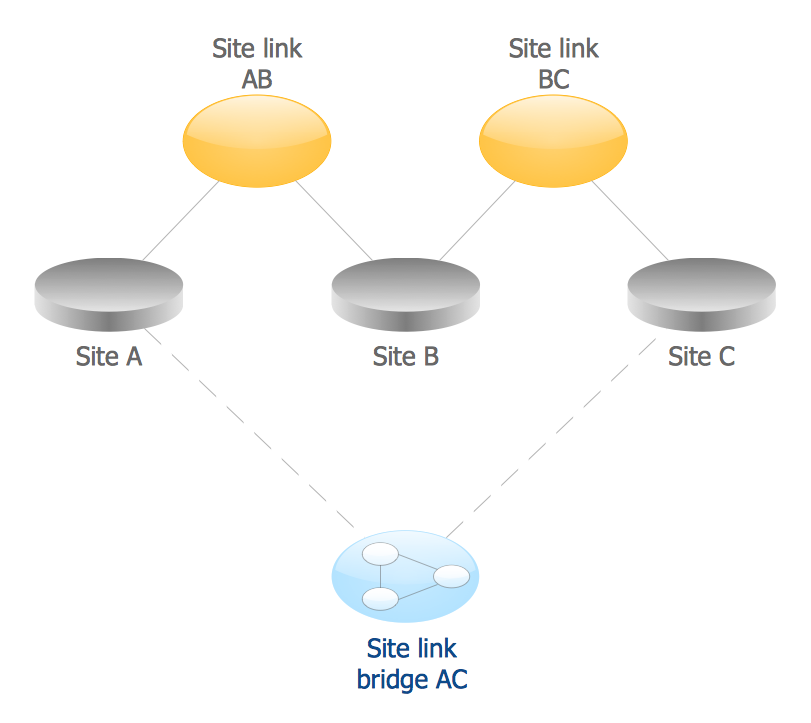
Example 3. Active Directory Diagram — Site Links
There are many Microsoft Active Directory management tools that may include the Active Directory Users and Computers, the Active Directory Domains and Trusts, the ADSI Edit, the Active Directory Services and Sites, Local Groups of Users and individual Users, the Active Directory Schema snap-ins for Microsoft Management Console, etc.
The mentioned management tools may not provide enough functionality to enable the efficient workflow in some large environments, but some of the third-party solutions are known to be extending the management and the administration capabilities, providing the essential features for a more convenient administration processes: automation, integration with other services, reports, etc.
There are four stencil libraries full of 69 vector design elements that all can be used for making any needed Active Directory diagrams in the Active Directory diagrams solution. There are 21 vector objects in one of the stencil libraries, such as “Domain”, “Computer”, “User”, “Group”, “Container”, “Print Queue”, “Contact”, “Organizational Unit”, “Policy”, “Volume”, “General Object”, “Site”, “Site Link”, “Site Link Bridge”, “Server”, “NTDS Site Settings”, “IP Subnet”, “Certificate Template”, “Connection”, “Licensing Site” and many other from the other libraries.
Such examples as the one called as an “Active Directory Structure Diagram” or another one named as an “Active Directory Domain Services Diagram”, same as an “Active Directory Diagram — Asymmetric Encryption”, “Active Directory Diagram — AD LDS as a Phone Book Service” and other templates from the mentioned solution can be truly useful and helpful for all the ConceptDraw DIAGRAM users.