Baseball DiagramBaseball Field – Corner View – Template
Baseball is a very fun sport game and it is nowadays one of the most popular games in many countries all over the world. It is very important to know all of the rules of baseball – both the game how to play and the positions on the baseball field, including all of the nuances. It is also always important to know the way the field has to be planned and so where the players should be and where they all should stand during the game, as well as their actions in different situations.
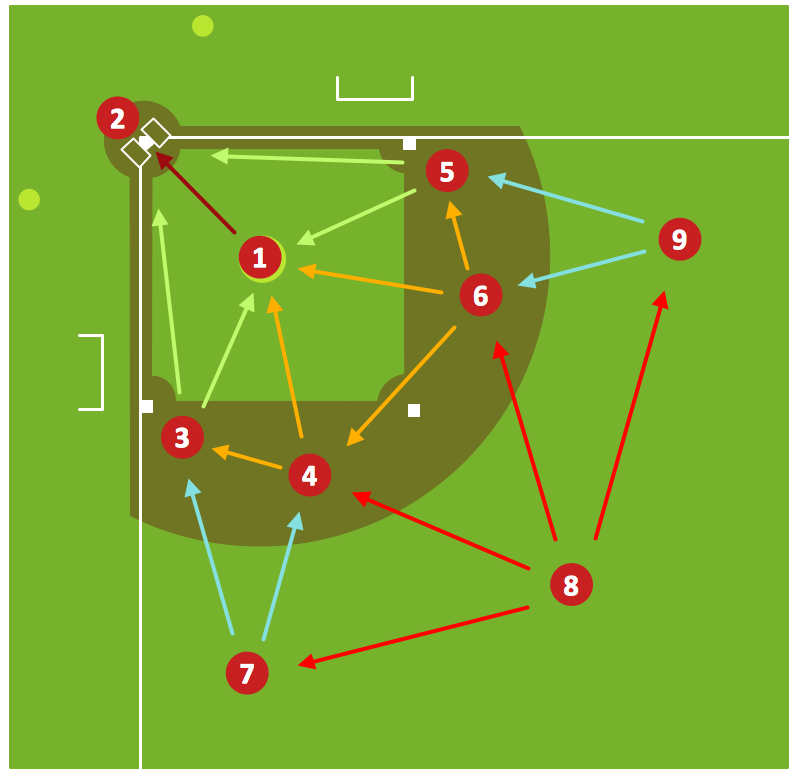
The rules of the baseball game also include the nine fielding positions, which have to be remembered. Each of these positions has its number. These numbers can also be used for scoring the so-called “putouts”: one - “pitcher”, two - “catcher”, three – “first baseman”, four – “second baseman”, five – “third baseman”, six – “shortstop”, seven – “left fielder”, eight – “centre fielder”, nine – “right fielder”.
Baseball game itself can be known also as a “bat-and-ball game”, which means it is a field game played by two opposing teams. This particular “bat-and-ball game” is played between two teams and there are nine players in each of these teams. These payers take turns “batting” and “fielding”. The members of the “batting” team try to score the so-called “runs” in a way of hitting the baseball ball. The ball itself should be thrown by the “pitcher” who has a “bat” to use it for playing. This “pitcher” swung by the batter with his “bat” and then he counter-clockwise around a few of bases, which are four all together. These bases are called “first”, “second”, “third” and there is a last one called “home plate”. A run can be scored when a player advances around the bases and then returns to his “home plate”.
In order to win this game, baseball players take turns hitting against the pitcher of their competitor – the “fielding” team, once their own team is “batting” one. This “fielding” team, in return, tries to prevent runs by getting hitters out in any of different ways. When a player from the “batting” team approaches a base and does it “safely”, then he can later attempt to run to subsequent bases during the “turns batting”. Later the teams switch between “batting” and “fielding” anywhere the “fielding” team records 3 “outs”.
A baseball game usually has all together nine “innings”. That team, which members score the greater number of runs by the end of the game wins the game. In case the scores are “tied” at the end of nine “innings”, then extra innings can be played. There is no game clock in baseball, but almost all of the games end upon having the ninth inning. Baseball was for the first time played in England in the middle of 18th century afterwards this game was brought by immigrants to North America, as that is the place where the version we know developed nowadays. By the late 19th century baseball game was widely recognized as the so-called “national sport” in the United States of America. Nowadays this sport game is very popular both in North America and Central and South America, as well as on the Caribbean islands and East Asia, especially in Japan.
The baseball fields are nowadays surrounded with a use of a fence. This fence is meant to be set at a distance ranging from 91 to 128 metres from the players “home” plate and it is there in order to mark the so-called “outer edge” of the “outfield”. Most of the professional baseball fields include the left and right foul poles, which have to be located at the ends of the “outfield” fence as well as in the intersection of the “foul lines”. According to the baseball rules, these poles should lie in so-called “fair territory”. In case the so-called “batted ball” passes over the “outfield wall” in flight and so touches the so-called “foul pole”, then it can be called as a “fair ball” and so the batter has to go for a “home” run.
A baseball field is also known as a “baseball diamond”. This field is the one, on which baseball players play their sport game. Sometimes this baseball field can be also called a “baseball park”. But it never matters that much the way you want to call this place, as you can always create a plan of such baseball field using ConceptDraw DIAGRAM software so it looks the way it should be – professional and simple. Planning to play this game or building such baseball field, you will find ConceptDraw DIAGRAM application very useful in order to make it simpler and quicker to create the plan you need. It is always better to use a computer and professional software, with the help of which you can create any needed drawing using the existing templates, rather than to make everything from the very beginning by yourself.
ConceptDraw DIAGRAM is the one, which is always better to have once you plan some good looking drawing, as the main tools for making such drawings as ConceptDraw DIAGRAM application were designed especially in order to provide the users of this software with all of the necessary tools for making their good looking plans.
CS Odessa has also developed another product, called ConceptDraw STORE, which is an application that can be used for working in ConceptDraw DIAGRAM This new application was designed in order to provide the ConceptDraw DIAGRAM users with many different solutions, including the “Baseball” one. In this solution you can find the "Baseball Fields" and "Baseball Positions" libraries and this combination of the "Baseball Fields" and "Baseball Positions" libraries gives you an opportunity to create a baseball-related drawing in only a few minutes. To be able to make one, we recommend you to drop any needed field object to your document from any of the libraries, mentioned above. Place the positions on the field and add arrows or text labels, if needed. Then job is done.
ConceptDraw DIAGRAM software extended with the “Baseball” solution provides the stencil libraries, templates and samples, which can allow ConceptDraw DIAGRAM users to make the baseball diagrams and other schemes. All of the needed tools for that, including the field objects, were designed in accordance with the real field dimensions and they all can be found in the solution, as well as the corner view template and many other samples.
ConceptDraw DIAGRAM extended with the Baseball solution provides access to libraries, templates and samples allows creating baseball diagrams and schemas. Fields objects are designed according to real fields dimensions. A set of fields samples includes dimensions. All plays and positions diagrams are available as ready-to-modify samples.
A combination of the "Baseball Fields" and "Baseball Positions" libraries gives you an ability to create a baseball-related drawing in seconds. Follow next steps to create you own baseball schema:
- From the "Baseball Fields" library drop a field object to your document
- From the "Baseball Positions" library drop all positions object you need to your document
- Place positions on the field according to your drawing idea
- Add arrows or text labels if needed.

Sample 1. Baseball Diagram – Baseball Field – Corner View – Template.
This diagram was created in ConceptDraw DIAGRAM using the "Baseball Fields" library from the Baseball Solution. An experienced user spent 2 minutes creating this sample.
It demonstrates a portion of the solution's capabilities and the professional results you can achieve.
All source documents are vector graphic documents. They are available for reviewing, modifying, or converting to a variety of formats (PDF file, MS PowerPoint, MS Visio, and many other graphic formats) from the ConceptDraw STORE. The Baseball Solution is available for all ConceptDraw DIAGRAM or later users.