Business Process Elements: Gateways
Design Elements: Gateways
A gateway is represented with a diamond shape and determines forking and merging of paths, depending on the conditions expressed.
ConceptDraw has 142 vector stencils in the 8 libraries that helps you to start using software for designing own Business Process Diagrams.
Use Gateways library with 8 objects from BPMN.
- Exclusive Gateway
- Exclusive Gateway (with marker)
- Event-Based Gateway
- Parallel Gateway
- Inclusive Gateway
- Event-Based Gateway to Start a Process
- Complex Gateway
- Parallel Event-Based Gateway

The Gateways library design elements have diamond shape and represent forking and merging of paths in business process flows.
Use the Gateways library objects in your BPMN 2.0 diagrams to show alternative flows and parallel paths of your business processes.
THREE RELATED HOW TO's:
ConceptDraw DIAGRAM is the only application on the Macintosh platform, supplied with a comprehensive Cisco icon set. For graphic solutions that support Windows, only Microsoft Visio has a library of Cisco shapes. ConceptDraw DIAGRAM is a valuable option to many network professionals that use Macintosh computers or work in a combined Mac and PC environment.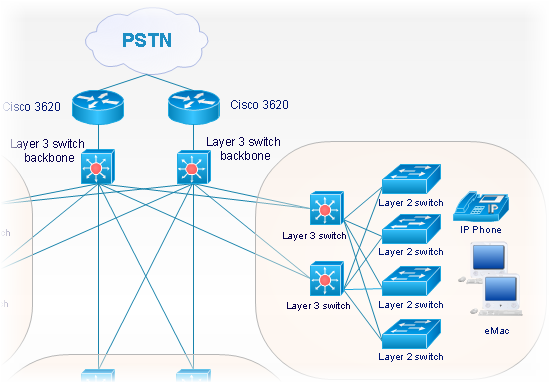
Picture: Cisco Network Objects in ConceptDraw DIAGRAM
The ConceptDraw vector stencils library Cisco Optical contains symbols for drawing the computer network diagrams.
Picture: Cisco Optical. Cisco icons, shapes, stencils and symbols
Related Solution:
Use ConceptDraw Expanded Objects library with 14 objects from BPMN. Expanded Objects are used for rapid design of Business Process Diagrams.
Picture: Business Process Elements: Expanded Objects
ConceptDraw
DIAGRAM 18