Create Soccer (Football) Positions
“Association football” is known to be another name for more commonly known name of the “football” or “soccer” game. It is a very popular nowadays team sport played between two teams of eleven players from each side sharing a spherical ball. This game is known to be played by 250 million people in more than 200 countries in the world, including the dependencies, which makes this game to be the world's most popular one. This game is played on a field with a rectangular shape and a goal at each of the ends. The object of this game is to score the more the better points by getting the given ball into the goal of the opposing team. There are many positions possible while playing this game. Thus, we want to mention a few of them in this article for all the ConceptDraw DIAGRAM users to know and so to use on their soccer field plans.
Goalkeeper is known to be the most defensive position in football as his main job is to stop the other team from scoring by palming, punching or catching the ball from shots, crosses or headers. Goalkeepers are known to be remaining in and around their own penalty area for most of the time during the soccer game. Thus, they have a better view of the pitch and so they often give advice to their defence when the other team is during set pieces or on the attack, being the only players on the pitch allowed to handle the ball, although it is restricted to their own penalty area. Positioning is known to be another important job of any goalkeeper involved in the game of soccer being one of the hardest to master.
Wearing differently coloured kit from the officials as well as the outfielders, goalkeepers usually choose to put the ones on including the yellow, grey, black and green colours as well as the shades of blue. First wearing in the 1970s, goalkeepers have worn the specialised gloves since then to make it simpler to catch the ball, as they provide a better grip and protect goalkeepers’ hands from hard headers and shots, as well making it easier to push or punch the ball away. Also, the caps were quite common in the period of between the 1910s and 1960s years. There were sometimes woolly jumpers used before, but not any more, at least not in any semi-professional or professional games nowadays.
Dribblers are known to be the players being close to the ball control having the ability to go past defenders by a sudden change of the direction as well as acceleration sometimes combined with an amazingly great pace. This skill is known to be used to create different opportunities for all the rest attackers as well as to score by breaking through the opposition's defence using the so called "trickery". Such players are known to be good at playing as wingers, attacking midfielders or secondary strikers, although a centre forward may also have similar skills.
Having your own plan of the soccer field you can always place all the soccer players the way you want them to be discussing each game and planning each of the football players’ behaviour for the next one. Thus, knowing that some of the players you know are good enough for being the goalkeepers or “dribblers”, you can always mention their positions with those people’s names on your freshly made drawing.
Besides mentioning the mentioned positions of the goalkeepers, you can always add some more, such as defenders’ ones to your plan.
Defenders are known to be playing behind the other football players - the “midfielders”. The defenders’ primary responsibility is to provide any needed support to the team and so to prevent the opposition from scoring any goal, remaining in the half of the field which contains the goal which they are meant to be defending. The taller defenders are the more chances there will be for them to move forward with an ease to the opposing team's so called “penalty box” while that team takes whether free kicks or so called “corner kicks”. It is always better to score using a head once the player is tall enough to do precisely it.
Another position in the game of soccer is a midfielder’s one, the one which the players take being in from of the defenders. The midfielders are simply the soccer players whose position of play is halfway between the defenders and the attacking forwards soccer players. The midfielders’ main goal is to maintain the possession of the ball, taking it from defenders in order to feed it to the strikers, and dispossessing the opposing players. Most of the managers field at least one central midfielder with a marked task of breaking up all the attacks of the players in the opposition. At the same time, the rest players are known to be more adept to having more equal responsibilities between both defence and attack, and they are known for being those who are in charge for creating the goals. All the soccer players taking the positions of midfielders, covering a lot of the different areas of a football pitch, being more often the players rather than the initiate attacking play for a team.
A winger can be a “left” one and “right”. The wingers were historically called as “outside-left” and “outside-right”, as well as “outside forward”. The winger is known to be an attacking player stationed in a wide position near the so called “touchlines”. These players can be classified also as “forwards”, taking into consideration their origin as the old outside forward, played out on the "wing" (for example, the side of the pitch). Such players continue to be termed this way in many parts of the world. Although, sometimes they are usually counted as part of the midfield. A winger's main attribute is usually speed which is used to attack as well as dribble all the past opponent's full-backs for getting behind the defence and so to deliver the passes and the crosses into the very center for their attackers. From time to time right and left footed wingers may swap sides of the field to have it as a tactical move for enabling the winger to cut inside against the opposing full-backs weaker foot, in order to look for a shooting opportunity, for example.
Having the Soccer solution downloaded from ConceptDraw STORE application means having an opportunity to create any needed soccer-related drawing, including the football field plan with all the needed positions mentioned on it.

Sample 1. Soccer (Football) Positions
A combination of the "Soccer (Football) Fields" and "Soccer (Football) Positions" libraries from the Soccer solution gives you an ability to create the soccer illustrations quick and easy. Follow next steps to create your own soccer diagram:
- From the "Soccer (Football) Fields" library drop a field object to your document;
- From the "Soccer (Football) Positions" library drop all positions object you need to your document;
- Place positions on the field according to your drawing idea;
- Add arrows or text labels if needed.
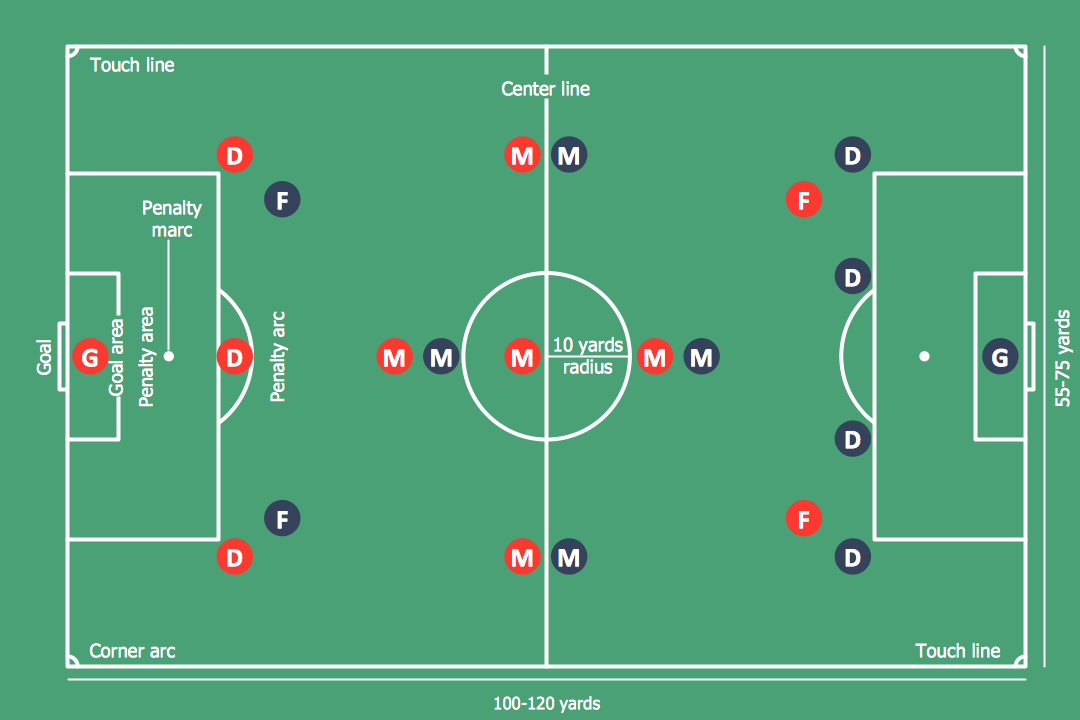
Sample 2. Soccer (Football) Positions
This diagram was created in ConceptDraw DIAGRAM using the "Soccer (Football) Fields" and "Soccer (Football) Positions" libraries from the Soccer solution. An experienced user spent 5 minute creating this sample. It demonstrates a portion of the solution's capabilities and the professional results you can achieve.
All source documents are vector graphic documents. They are available for reviewing, modifying, or converting to a variety of formats (PDF file, MS PowerPoint, MS Visio, and many other graphic formats) from the ConceptDraw STORE. The Soccer Solution is available for all ConceptDraw DIAGRAM or later users.

-Sample.png)

-Sample.png)