Value Stream Mapping Symbols
Value Stream Mapping is a graphical technique that provides possibilities to improve analysis of a manufacturing process, at the stage of the transferring information or materials that required to deliver a product or service to the customer.
VSM symbols are the best for a production process designing.
Value Stream Mapping ensures a core analysis' items in a comprehensive graphical approach:
- The interplay between all of a manufacturing processes.
- The communications and materials during the complete production process.
- Efficiencies and losses of complex systems.
- Elaborate and implement actions that push forward organization's culture changes.
The entire Value Stream Mapping method uses a graphical representation of the manufacturing process, factors' pros and cons, that all stakeholders can easily understand.
The new Value Stream Mapping solution found in the ConceptDraw Solution Park continues to extend the range of ConceptDraw DIAGRAM. This solution extends software with several templates and samples, also value stream mapping symbols for drawing Value Stream Diagrams.
Value Stream Mapping Symbols
 Production Control
Central production scheduling or control department, person or operation.
 Customer/Supplier
It is the usual starting point for material flow.

 Inventories
 Shipment
 Electronic Information Flow Electronic flow such as EDI, Internet, intranets, LANs, WANs.
 Information Flow
 Material Flow/ PUSH Arrow "Pushing" of Material from One Process to the Next Process.
 Manual Info
 Pull Arrow Pull movement between internal steps.

 Supermarket

 Safety Stock
 Material Pull
 Dedicated Process Process, operation, machine or department, through which material flows.
All these value stream mapping symbols from the Value Stream Mapping library of Value Stream Mapping Solution were professionally designed to facilitate a drawing process for ConceptDraw DIAGRAM users.
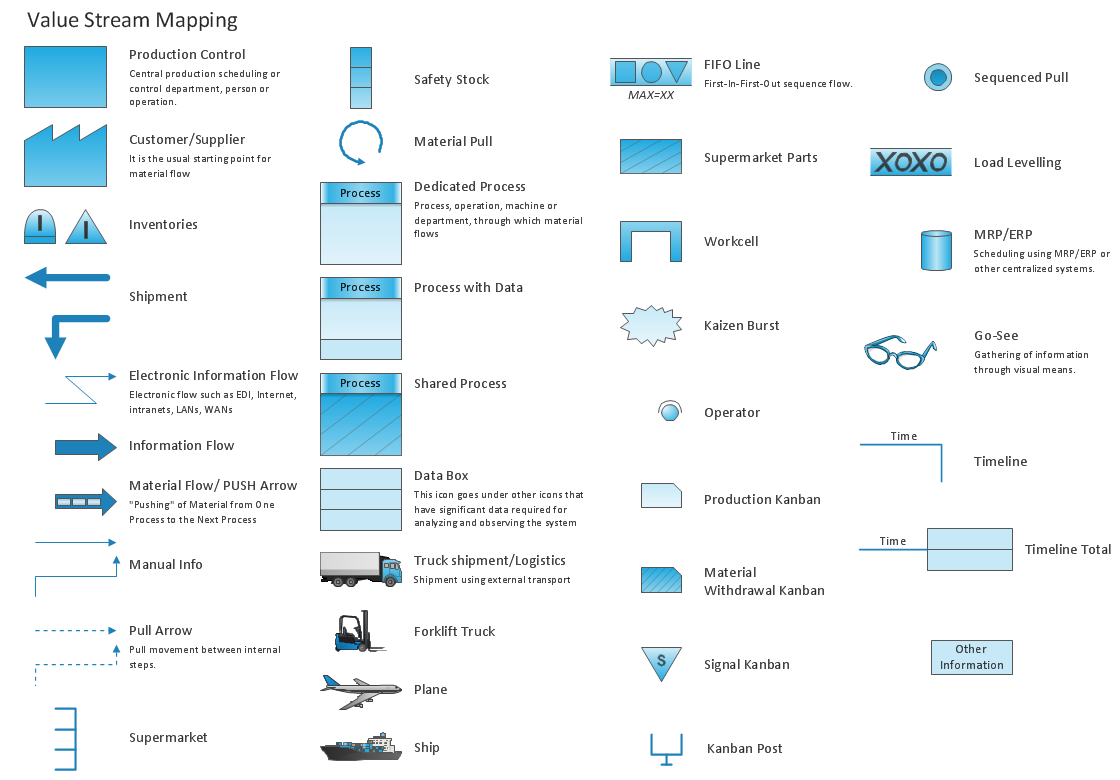
Example 1. Value Stream Mapping Symbols
Besides, all these objects are vector objects, so you can resize them without loss of quality, change their color to make your maps more bright and attractive.

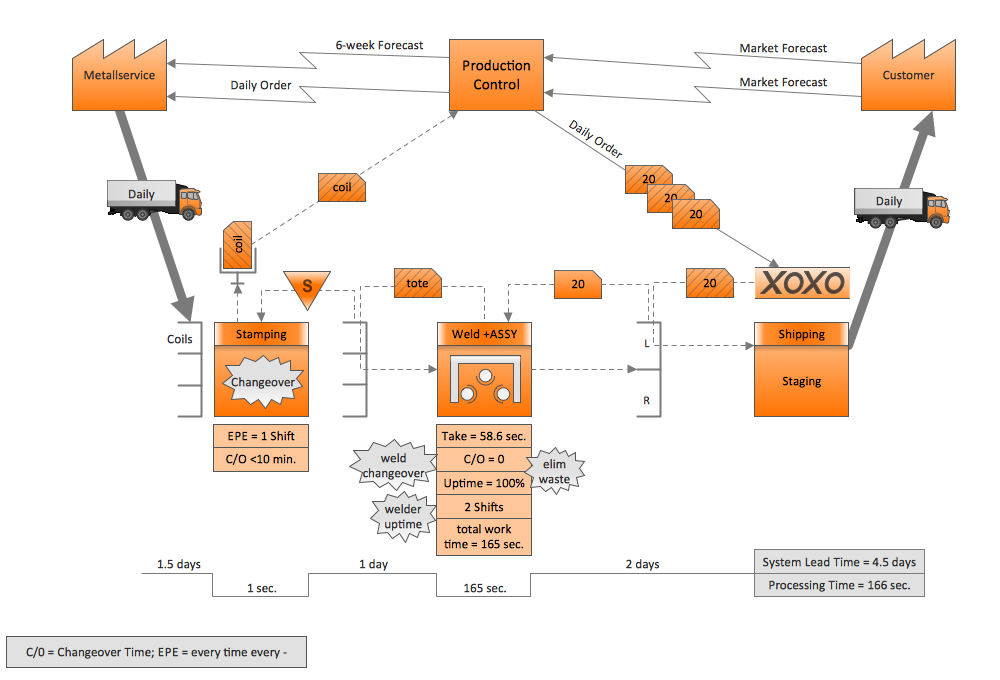
Example 2. Value Stream Mapping Sample
This sample was created in ConceptDraw DIAGRAM using the value stream mapping symbols from the Value Stream Mapping Solution and shows the value stream in a manufacturing, production control and shipping processes. An experienced user spent 20 minutes creating this sample.
Use the Value Stream Mapping Solution for ConceptDraw DIAGRAM software to create your own professional looking Value Stream Maps quick, easy and effective.
All source documents are vector graphic documents. They are available for reviewing, modifying, or converting to a variety of formats (PDF file, MS PowerPoint, MS Visio, and many other graphic formats) from the ConceptDraw STORE. The Value Stream Mapping Solution is available for all ConceptDraw DIAGRAM or later users.
NINE RELATED HOW TO's:
Total quality management is the one known to be consisting of some organization-wide efforts put in order to install and to make some climate in which this organization can continuously improve its ability to deliver the high-quality products and services to its customers permanently.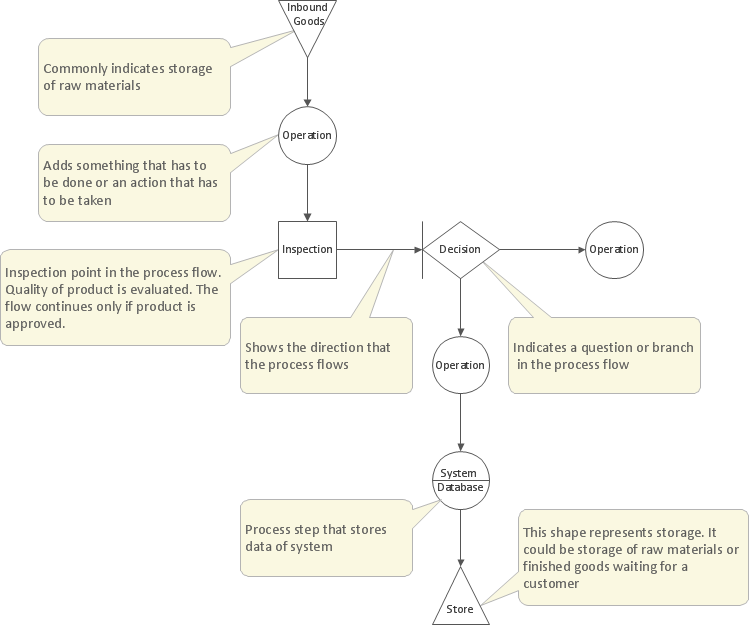
Picture: Total Quality Management Definition
Related Solution:
A flowchart is a powerful tool for examining processes. It helps improving processes a lot, as it becomes much easier to communicate between involved people, to identify potential problems and to optimize workflow. There are flowcharts of different shapes, sizes and types of flowchart vary from quite basic process flowcharts to complex program flowcharts. Nevertheless, all these diagrams use the same set of special symbols like arrows to connect blocks, parallelogram to show data receiving or rectangles for showing process steps.
Basic flowcharts are used to represent a simple process algorithm. A basic flowchart notation consists of rectangles (business processes), arrows (the flow of information, documents, etc.). The same notation is used in items such as the "decision", which allow you to do the branching. To indicate the start of the entire business process and its termination can be used the "Terminator" element. The advantages of Basic Flowchart are simplicity and clarity. With it you can quickly describe the business process steps. Creating of Basic Flowchart does not require any special knowledge, as easily understand by employees with different levels of education and IQ.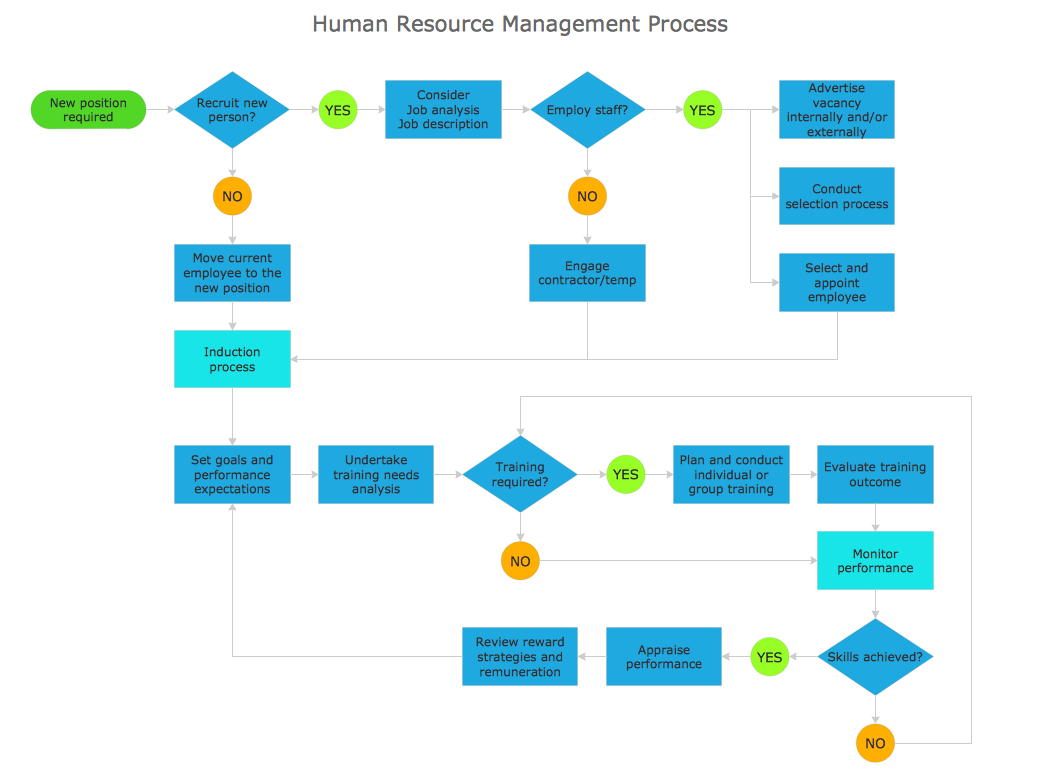
Picture: Types of Flowchart: Comprehensive Overview
Related Solution:
There are numerous articles about the advantages of flowcharting, creating business graphics and developing different charts. Nevertheless, these articles are almost useless without the main component - the examples of flowcharts, org charts and without a fine example, it is difficult to get all the conveniences of creating diagrams. You can find tons of templates and vivid examples on Solution Park.
This illustration shows a variety of business diagrams that can be created using ConceptDraw DIAGRAM. It comprises a different fields of business activities: management, marketing, networking, software and database development along with design of infographics and business illustrations. ConceptDraw DIAGRAM provides a huge set of sample drawings including business process modeling diagrams,, network diagrams, UML diagrams, orgcharts, DFD, flowcharts, ERD, geographical maps and more.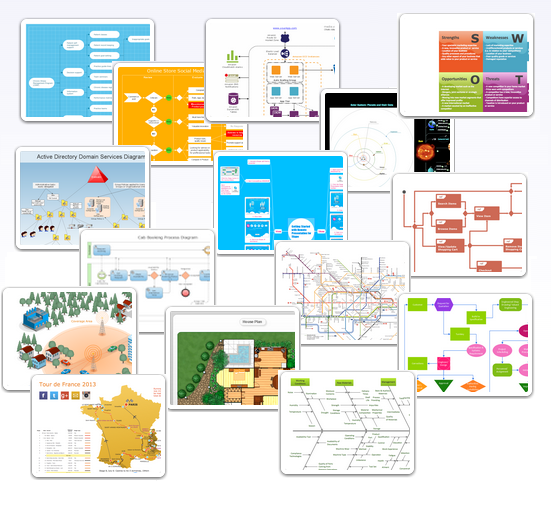
Picture: Examples of Flowcharts, Org Charts and More
Related Solution:
What is a Process Flow Map? It is a chart which visually illustrates a business process and how its steps work together. Process Flow Maps help companies define problem areas, inefficient activities for the purpose of further increasing performance and profitability of businesses. ConceptDraw DIAGRAM diagramming and vector drawing software extended with Flowcharts solution from the Diagrams area of ConceptDraw Solution Park is efficient and productive software for fast and simple creating professional looking Process Flow Map.
Picture: Process Flow Maps
Related Solution:
Lean Manufacturing tool is a new Value Stream Mapping solution found in the ConceptDraw Solution Park.
Picture: Lean Value Stream Map
Related Solution:
VSM symbols are the best for a production process designing. The entire Value Stream Mapping method uses a graphical representation of the manufacturing process, factors' pros and cons, that all stakeholders can easily understand. Value Stream Mapping is a graphical technique that provides possibilities to improve analysis of a manufacturing process, at the stage of the transferring information or materials that required to deliver a product or service to the customer.Picture: Value Stream Mapping Symbols
Related Solution:
ConceptDraw DIAGRAM diagramming and vector drawing software offers a powerful Value Stream Mapping solution from the Quality area of ConceptDraw Solution Park which contains a set of useful tools for easy drawing Value Stream Map of any complexity.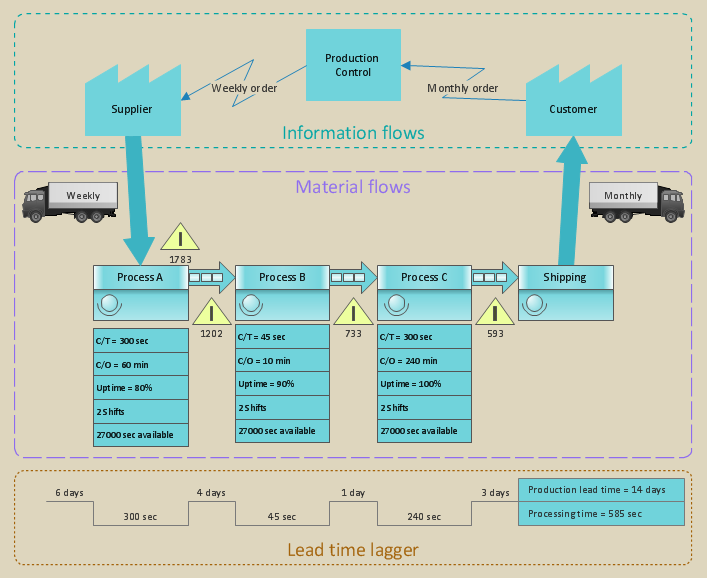
Picture: Value Stream Map
Related Solution:
This sample was created in ConceptDraw DIAGRAM diagramming and vector drawing software using the Workflow Diagrams Solution from the Software Development area of ConceptDraw Solution Park.
This sample shows the Workflow Diagram that clearly illustrates stages a BPM consists of and relations between all parts of business. The Workflow Diagrams are used to represent the transferring of data during the work process, to study and analysis the working processes, and to optimize a workflow.

Picture: Software Work Flow Process in Project Management with Diagram
Related Solution:
A database is a data collection, structured into some conceptual model. Two most common approaches of developing data models are UML diagrams and ER-model diagrams. There are several notations of entity-relationship diagram symbols and their meaning is slightly different. Crow’s Foot notation is quite descriptive and easy to understand, meanwhile, the Chen notation is great for conceptual modeling.
An entity relationship diagrams look very simple to a flowcharts. The main difference is the symbols provided by specific ERD notations. There are several models applied in entity-relationship diagrams: conceptual, logical and physical. Creating an entity relationship diagram requires using a specific notation. There are five main components of common ERD notations: Entities, Actions, Attributes, Cardinality and Connections. The two of notations most widely used for creating ERD are Chen notation and Crow foot notation. By the way, the Crow foot notation originates from the Chen notation - it is an adapted version of the Chen notation.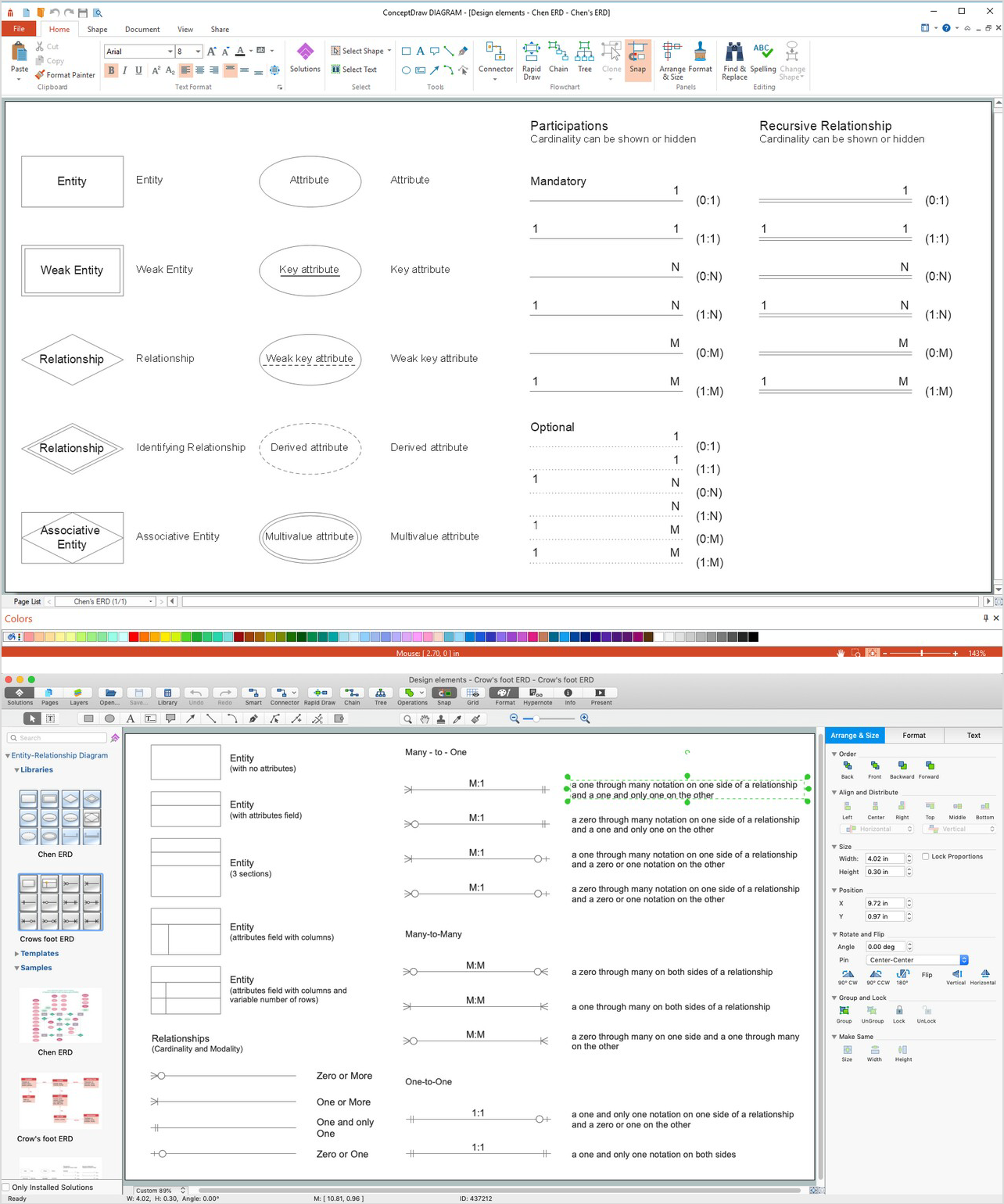
Picture: ERD Symbols and Meanings
Related Solution: