Export from ConceptDraw MINDMAP to HTML
|
It’s often that the information, held in a mind map needs to be shared with other people. Not every one has the required application. ConceptDraw MINDMAP provides a variety of export capabilities to help with that situation. For instance, you can export your mind map to html format and then embed it into a web-page. There are two html-export options in ConceptDraw MINDMAP : export map as an image or as an outline. |

Pic. 1. An HTML-file exported from ConceptDraw MINDMAP
Export the mind map to HTML format, preserving the links so they can be used to download documents.
See also Samples of mind maps:
- Mind Maps
- Mind Maps — Marketing
- Mind Maps — Idea Communication
- Mind Maps — Mind Map Exchange
-
Mind Maps — Presentation Exchange
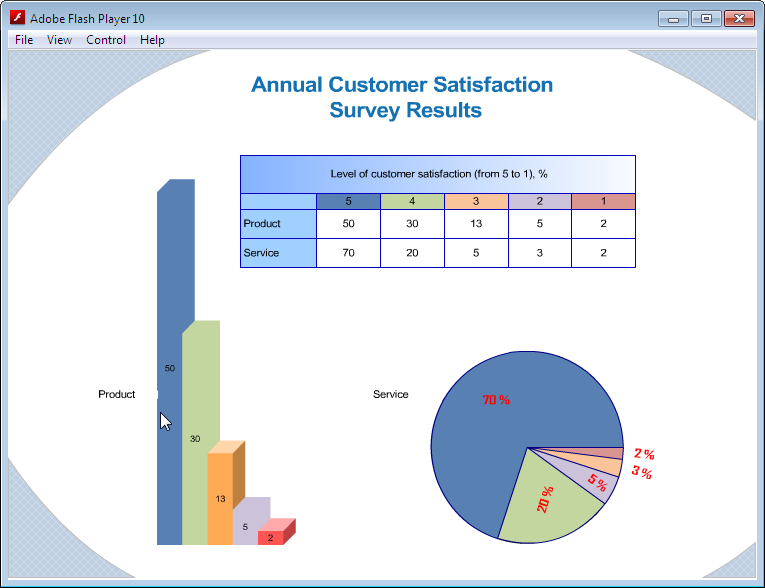
THREE RELATED HOW TO's:ConceptDraw MINDMAP Mac OS X version enables you to export your mind map into the iCal calendar and generate tasks from mind map topics. Picture: Export from ConceptDraw MINDMAP to Apple iCalRelated Solution:ConceptDraw DIAGRAM’s has extensive export capabilities which allow you to export your drawing as MS PowerPoint® and Adobe PDF files. You can also embed a drawing into an HTML page after saving it in SWF or SVG formats.
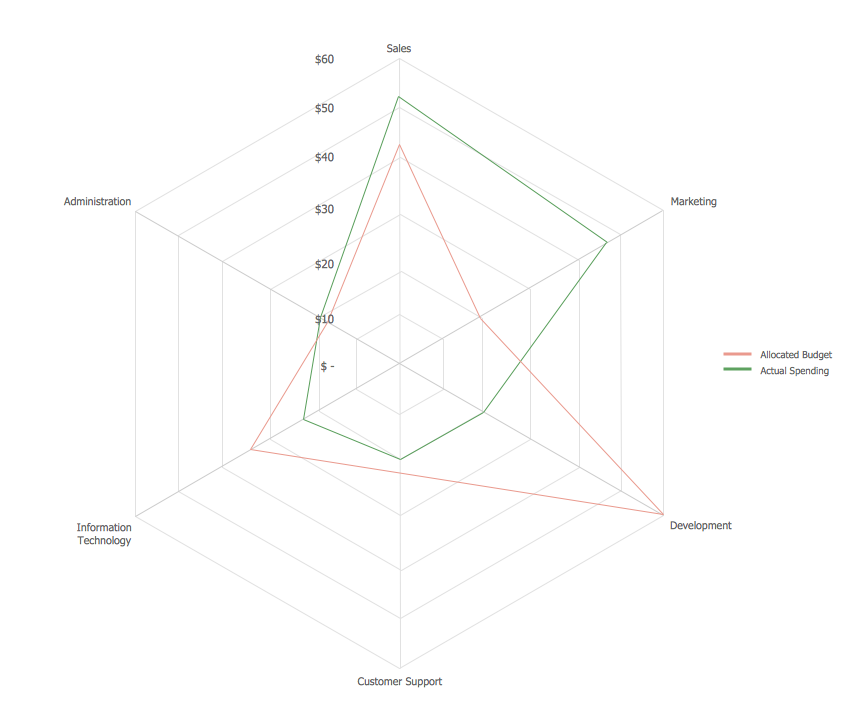
 Picture: Export from ConceptDraw DIAGRAM Document to SWF (Adobe® Flash®) FileThis sample shows the Spider Chart that represents the budget and spending for one organization and allows to compare them. The multivariate data are represented on the Spider Chart as a two-dimensional chart with four or more variables displayed on the axes that start in one point. The Spider Charts are used in the management, business and sport.
 Picture: Spider Chart TemplateConceptDrawMINDMAP 16