Shotgun Formation (Offense) Diagram
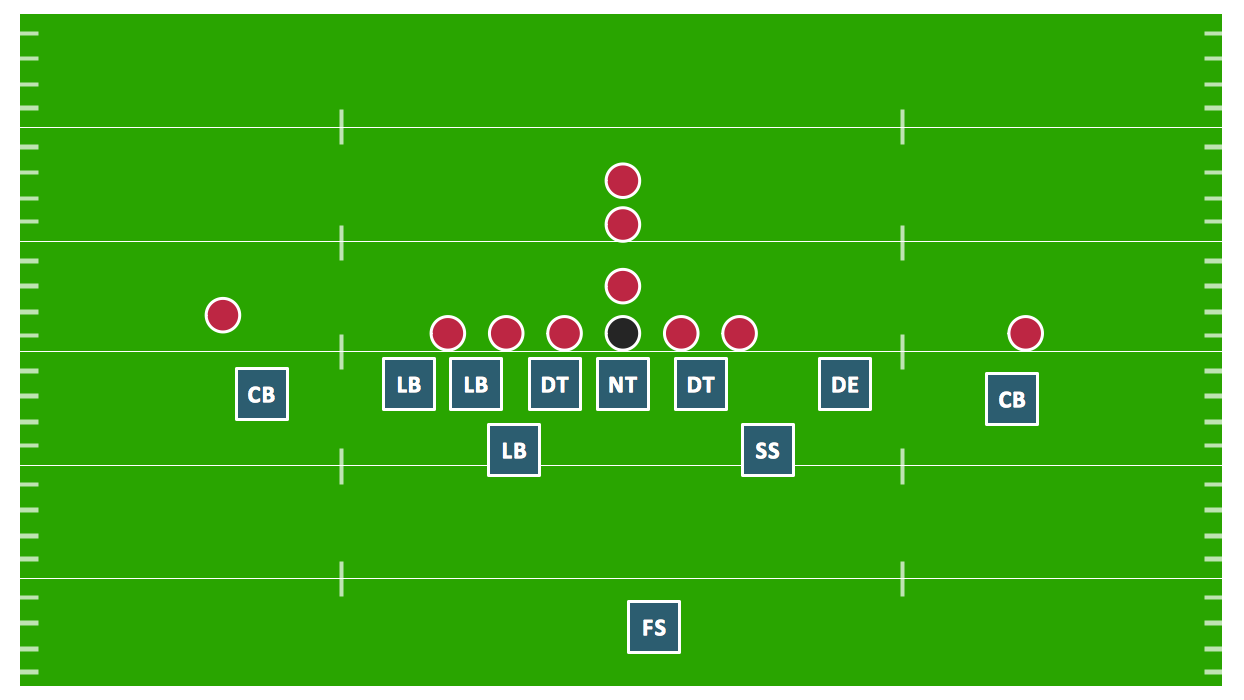
"You have a shotgun formation any time the QB lines up about 5 yards behind the center and receives a snap rather than a handoff from the C. Typically, this formation uses only 1 back with 3 WRs and 1 TE, although any variation of players in the backfield is possible. The advantage of the QB’s position on this formation is that he can see the defensive alignment more clearly and has more time to throw the ball. Teams with excellent QBs and an aggressive passing game—like Indianapolis and New England—have used the shotgun as their standard offensive formation in recent years." [totalprosports.com]
The Football solution for ConceptDraw DIAGRAM software contains a set of libraries, templates and samples allowing football specialists to draw football diagrams with ease. A set of predesigned fields and positions allows producing football diagrams without any drawing experience.
A combination of the "Football Fields" and "Football Positions" libraries gives you an ability to create a football-related drawing in seconds. Follow next steps to create you own football schema:
- From the "Football Fields" library drop a field object to your document
- From the "Football Positions" library drop all positions object you need to your document
- Place positions on the field according to your drawing idea
- Add arrows or text labels if needed.
Producing a set of football diagrams, for a example a set of popular offenses, you may significantly save time using multipage document. In this case you put a field object to background page, and then place positions objects to each page. Don't mind to put offense name to page title, this will help you navigate through the document.
Sample 1. Football – Shotgun Formation (Offense).
This diagram was created in ConceptDraw DIAGRAM using the "Football Positions" library from the Football solution. An experienced user spent 30 minutes creating this sample.
The samples you see on this page were created in ConceptDraw DIAGRAM using the Football Solution; they demonstrate a portion of the solution's capabilities and the professional results you can achieve.
All source documents are vector graphic documents. They are available for reviewing, modifying, or converting to a variety of formats (PDF file, MS PowerPoint, MS Visio, and many other graphic formats) from the ConceptDraw STORE. The Football Solution is available for all ConceptDraw DIAGRAM or later users.
SEVEN RELATED HOW TO's:
Visual depiction of American Football schemas is key secret to successful understanding game details. Offensive and defensive formations can be easily drawn using ConceptDraw DIAGRAM software enhanced with the Football solution from the ConceptDraw Solution Park.
Picture: Offensive Formation – T-Formation – Diagram
Related Solution:
Explaining offensive strategies of American Football is practically impossible without drawing a diagram. If you need to do this more than once you have to choose an appropriate tool allows you to change diagrams easily. ConceptDraw DIAGRAM extended with the Football Solution is the best choice for this case.
Picture: Offensive Strategy — Spread Offense Diagram
Related Solution:
Using the diagrams is the easiest way for coaches and other sport specialists to explain the rules, strategies and tactics of the basketball play. The Basketball solution from the Sport area of ConceptDraw Solution Park was designed as a tool that will help you produce the basketball plays diagrams in a few minutes.
Picture: Basketball Plays Diagrams
Related Solution:
Extending ConceptDraw DIAGRAM software with the Baseball solution you receive a complete set of libraries, templates and samples allowing to draw baseball diagrams in seconds. You can start from a template, change positions and get ready diagram in some clicks.
Picture: Baseball Diagram – Colored Baseball Field
Related Solution:
Extending ConceptDraw DIAGRAM software with the Football solution from the ConceptDraw Solution Park you receive a complete set of libraries, templates and samples allowing to draw defensive plays diagrams in seconds. You can start from a template, change positions and get ready diagram in some clicks.
Picture: Defensive Play Diagram – Under Front
Related Solution:
It's obvious that any building has a plan, and it is a hard and diligent work to draw one. And it's great that nowadays there are software tools for those purposes. For instance, ConceptDraw Pro contains design elements depicting different parts of sport fields. It's easy to use them and it facilitates your work exponentially.
Planning of athletic facilities, playgrounds and Leisure Centers, needs thoughtful and creative approach. Any layout regarding to sport facilities should satisfy the requirements of both athletes and spectators. Well designed sport fields , playgrounds and recreation spaces attract people to sport activities in the cities and countryside. ConceptDraw Sport Field Plans solution is useful and convenient professional drawing tool. It delivers the kit of vector libraries that can be used for representing sport fields, sportgrounds and recreation spaces: football, hockey, volleyball, cricket, basketball , swimming pool, etc.
Picture: Building Drawing Software for Design Sport Fields
Related Solution:
Electrical plan is a document that is developed during the first stage of the building design. This scheme is composed of conventional images or symbols of components that operate by means of electric energy. To simplify the creation of these schemes you can use house electrical plan software, which will not require a long additional training to understand how to use it. You only need to install the necessary software ant it’s libraries and you’ll have one less problem during the building projection.
Any building contains a number of electrical systems, including switches, fixtures, outlets and other lightening equipment. All these should be depicted in a building electrical plans and included to general building documentation. This home electrical plan displays electrical and telecommunication devices placed to a home floor plan. On the plan, each electrical device is referenced with the proper symbol. Electrical symbols are used for universal recognition of the building plan by different persons who will be working on the construction. Not all possible electric symbols used on a certain plan, so the symbols used in the current home plan are included to a legend. The electrical home plan may be added as a separate document to a complete set of building plans.
Picture: How To use House Electrical Plan Software
Related Solution: