Garden Landscape Design:A Comprehensive Guide to ConceptDraw Garden Landscape Design Software
Garden landscape design is more than just making your yard beautiful. Landscape design is an art that helps to plan the outside territory, planting, garden buildings, and garden furniture arrangement to transform your yard into an appealing place for relaxation, playing, hobbies, entertaining friends, etc. It complements your home and improves its attractiveness creating an integral composition. Moreover, landscape planting helps to purify the air by absorbing harmful pollutants and chemicals.
At the same time, some landscape solutions have both appealing and functional roles, such as, for example, retaining walls or rocks. They help to reduce the risk of erosion of the soil that may be influenced by rain, wind, landslides, or other natural factors. The thought-out construction of drainage helps to direct stormwater and runoff to a specially designated area to prevent flooding of the site.
It is important that garden landscaping design corresponds the individual needs and requirements, and meets the expectations of owners creating for them an area where they can enjoy and relax when spending time. Landscape design helps to provide zoning of the side breaking it down for secluded and comfortable areas of different purposes. Plan placement of such constructions as a pool, outdoor patio, pergola for shade, grill, and perhaps bar area, or the place where you would like to grow fruits, berries, or vegetables.
What is a Garden Landscape Design
Garden landscape design is the process of creating plans and designs for the layout and planting of various landscapes, public and private sites. They combine architectural, geographic, topographic, surveying, and biological knowledge, as well as imagination, creativity, and art skills. These plans help to use the space efficiently and create the best area that meets the individual needs of owners or future visitors.
Garden landscape design is a perfect way to make your landscaping dreams into reality. It includes a detailed study of the site and considers various ecosystem factors, soil type, lightning, humidity, and other natural factors to place the right plants in the right spots. Also, they should consider the dynamic of gardens, which significantly change their appearance depending on the speed of plants' growth or the seasons change, bloom-time, and type of plants — annual or perennial, evergreen or deciduous. The use of landscape design software programs makes landscape planning easier.
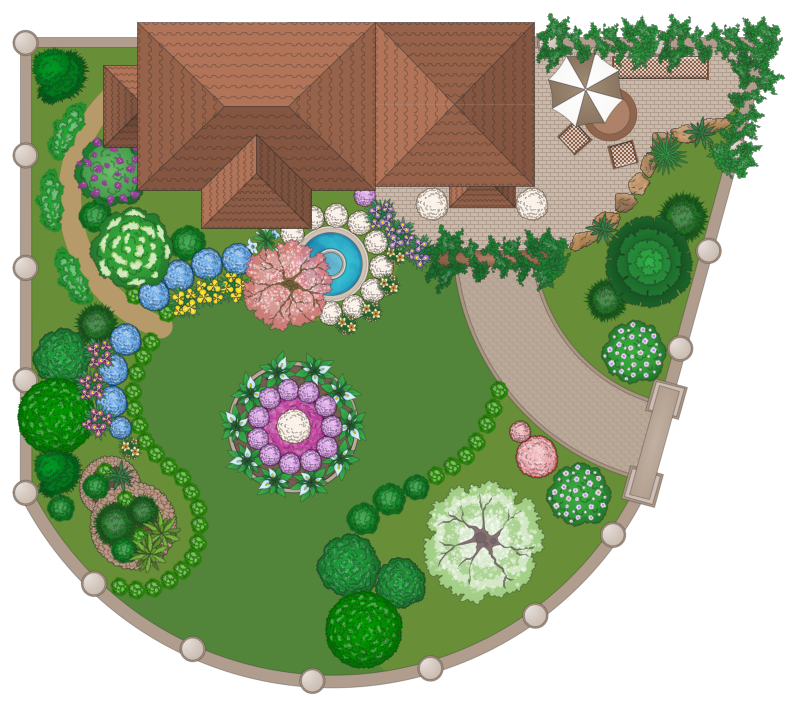
Example 1. Garden Landscaping — Domestic Garden
Landscape Design Basics Elements
The elements of landscape design are the planning tools, which allow to compose the garden compositions. They help to implement the selection and placement of plants, determine materials, types, and sizes of various yard design objects, and much more. The balance of key elements of landscape design including forms and lines, textures and materials, color, contrast, light, patterns, and scale helps to achieve harmony in proportions and an appealing appearance of a space.
- Plants, flowerbeds, ponds, pools, terraces, pergolas, playgrounds, and other decorative elements and furniture have their own forms (square, round, freeform, etc.) and their combination is the foundation of professional landscaping and helps to create different landscape styles — formal structured gardens or informal natural gardens, modern, traditional, etc.
- Paths and walkways form the lines and also have their shapes — straight, curved, horizontal, diagonal.
- Different textures provide both plantings and hard static architectural elements like paths, stones, sculptures, fountains, arches, arbors, etc.
- Color is a key component in landscape design. Bright colors and apt combinations of colors are the first that attracts our attention. In contrast to interior design, the color palette in a landscape design tends to change according to vegetation period and season. The combination of evergreens with other plants and flowers helps to create unique compositions in four seasons landscaping, appealing the entire year.
- Contrast in shapes, colors, or other characteristics helps to create extraordinary and unusual compositions.
- Light is an essential element that helps create a charming effect in the garden in the evening and at night using light fixtures of various kinds.
- Scale and sizes of a site should be considered in all details of landscape design, the growth of plants is predicted and should match with buildings.
- The additional elements, decking, and furniture also have great value in landscape design to furnish different areas and reach a unique design style.
Planning Ideas
Planting of gardens, yards, parks, and other areas begins with planning. The representation of garden and backyard landscaping design ideas in the plan helps to think over all details, use the space efficiently, and implement your design ideas exactly at various levels and in various areas. Garden and landscape design planning involves creating plans of areas not covered by buildings, separate territories, or surrounding buildings. Site planning deals with planning the arrangement of buildings, roadways, planting, and other elements.
At the same time, land planning is a large-scale development including deep topographic, ecological, technical, and other research before creating plans. Master planning involves the development of large-scale plans for open space areas like parks including planning of utilities, water systems and drainage, etc. Environmental planning supports a comprehensive planning of the environment, garden and landscape design, urban territories, etc. with ecological requirements accounted for.
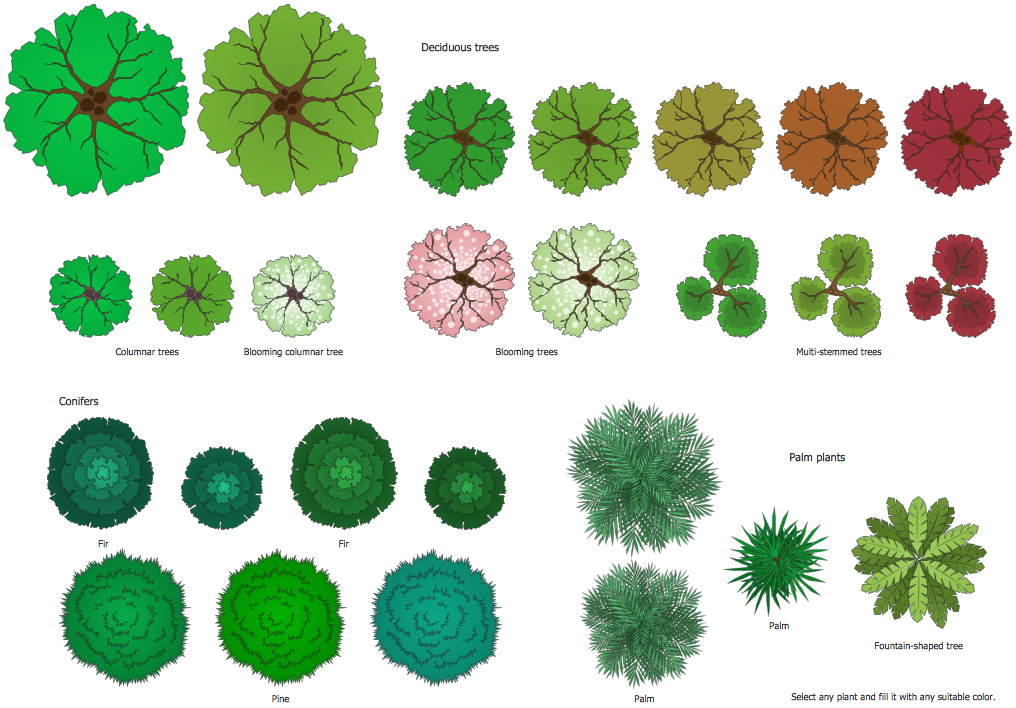
Example 2. Bushes and Trees Library Design Elements
Basic Principles of Landscape Design
The basic principles of landscape design draft the ways how the landscape design elements should be used and allow you to achieve the best results for a defined area. They are used in concern the overall feeling of landscape and controlling movement of the viewer's sight and focus. These include:
| Basic Principles | Description |
|---|---|
| Proportion | Defines the ratio of the size of plants, buildings, furniture, and other elements at the site |
| Transition | Helps to make smooth visual passage between objects of extremely different parameters, for example, different heights to smooth this difference |
| Order | Supposes the spatial organization (three-dimensional arrangement) and balance between the elements in landscape design |
| Regulating lines | Imaginary lines taking their source from static elements, such as walls, windows, fences, and breaking up the space to determine high of plants and other parameters, align and arrange them efficiently |
| Balance | Is achieved in two ways: symmetrically when the plants from one side are the mirror image of the other or asymmetrically |
| Repetition | Applied to species, forms, and colors helps to keep order, proportion, symmetry, and build unity in a composition |
| Alternation | Applies a minor change in repetition sequence and is a way to create a pattern |
| Rhythm | Patterned repetition of a motif used to add identity and avoid monotony |
| Gradation | Gradual change in some characteristics like color or size that makes repetition more interesting and extraordinary |
| Dominance | Organization of focus on some components or elements in a landscape to catch sight. It is achieved through using a contrasting color or size, extraordinary form or texture against the surrounding landscape. Often these are sculptures or water elements, plants of unique form or species |
| Variety | Supposes the combination of different plants to create various design compositions and effects |
| Unity or harmony | A principle that helps to unify different landscape elements in a harmonic holistic composition where all plants complement each other |
| Unity of three | A particular case, a principle that supposes the unification of plants in groups of three to create a visual landscape balance |
| Interconnection | Applied to elements and different landscape areas is often realized through the chain paths or routes |
| Simplicity | Helps to avoid chaos and distraction of attention in the landscape through eliminating non-essential elements and making accents through eliminating non-essential elements and making accents |
| Focalization | Forcing of the viewer’s perspective to a specific focal point or particular design element |
How to Draw Garden Landscape Designs?
Garden landscape plans are used to plan landscaping design surrounding a new building or to renovate an existing garden when it is obsolete or you simply desire to change something. Drawing a scale plan is important and helps to think over all details, choose plants and materials correctly, count and order the correct quantities of materials, and finally, save your money and time, and achieve the best result that corresponds to your dreams and desires. It is a lot easier to make all needed changes in the stage of planning than remodel the site when the design is already implemented and suddenly you don't enjoy it.
Start by taking measurements and determining the degree of detail, and then follow to designing your landscape design plan. You can rough sketches on paper, but for the ideal final plan it is more convenient to use special landscape design programs. The bird’s-eye view of the property and site provides a complete understanding of a future result, helps to arrange all to the small details and determine how each element fits other ones.
Drawing up a detailed plan is really useful. Map out the outline according to the site's size and shape, mark the boundaries and position of existing elements and buildings, their windows and doors, and where the sunlight falls. Then outline the layout of paths, stairs, and other key elements, such as gazebo, pool, fountain, poles, slopes, children's playground, etc. Add to your design a focal point — some element that draws sights like a sculpture, fountain, stunning tree, or some other. Think over the textures and plan the arrangement of different plants — trees, shrubberies, flowers, evergreens, etc. The compositions of plants with rocks are advantageous. Then plan the arrangement of garden furniture. It is important to find a balance between sizes and forms of components, repetition and unique elements, and eliminate monotonous or excessiveness. Take into account the sun, shadows and wind patterns, soil type, and other climate parameters when choosing the location for various elements.

Example 3. ConceptDraw DIAGRAM Garden Landscape Design Software
Overview of ConceptDraw Garden Landscape Design Software
ConceptDraw DIAGRAM is the best garden landscape design software, which suits the best for both beginners and professional users. Even if you've never tried designing a landscape before, it is also for you due to the Landscape & Garden solution. Landscape visualization is a complex process, but ConceptDraw DIAGRAM makes it significantly simpler. It provides various tools to help you create realistic images of natural or urban areas using different techniques and concepts and then implement them during landscape construction.
ConceptDraw Diagram Possibilities
Start from a blank sheet or one of the included samples as an example or start point, and use the pre-made design elements from the Landscape & Garden solution libraries for ConceptDraw DIAGRAM garden landscape planner. Drag the shapes of multifarious plants, paths, patios, ponds, garden furniture, outdoor recreation elements, and other components and accessories you want to see in your landscape design and arrange them in a desired way. Add the eye-catching plants and accessories to make your design exceptional.
Benefits of Using ConceptDraw DIAGRAM for Garden Landscape Design
ConceptDraw DIAGRAM is a powerful landscape visualization and garden design tool useful for architects, designers, and garden owners to depict, communicate, and realize their design ideas. Incorporate your dreams and goals, and be open to changes. Collect inspiration and try different design techniques and best practices, various structures and materials, explore alternatives, and create several versions of the design plan to choose the best one.
Convey your design vision, ideas, and concepts to different audiences, clients, builders, greeners, and other stakeholders quickly and easily. Experiment and improve your creativity, analytical and critical thinking. Update your project at any time and any changes, and evaluate the impacts of any changes on the plan before starting reconstruction.
Managing Large and Detailed Designs
Managing both simple and large detailed designs for extensive outdoor areas is easy in the best garden design app ConceptDraw DIAGRAM. For the last ones, planning has a special value, because large-scale landscape projects require special attention and accuracy. The efficient collaboration of a landscape or garden designer or architect with builders through a detailed plan helps achieve the desired results or even exceed expectations. Moreover, a long-term master plan for your landscape is important to meet local building codes and achieve the appropriate building permits.
Oversee the entire design on one sheet, evaluate how different areas harmonize with each other at the stage of planning, and also coordinate the work of builders at the stage of implementation. Prioritize, revitalize, and elevate the appearance and functions of a garden easily with Landscape & Garden solution. Address the inherent qualities and requirements of a particular site.
Plan your landscape space in advance, at the stage of planning buildings' construction, because landscape design is not only about planting appealing plants, but also drainage and other technical works and constructions that affect not only garden space but also nearby buildings.
Garden Landscape Design Examples
ConceptDraw DIAGRAM plant landscape design software and its Landscape & Garden solution provide a large number of garden landscape design examples of various styles for small and large sites of different shapes. Each plan is an individual project and an example of ConceptDraw DIAGRAM efficiency in landscape design.
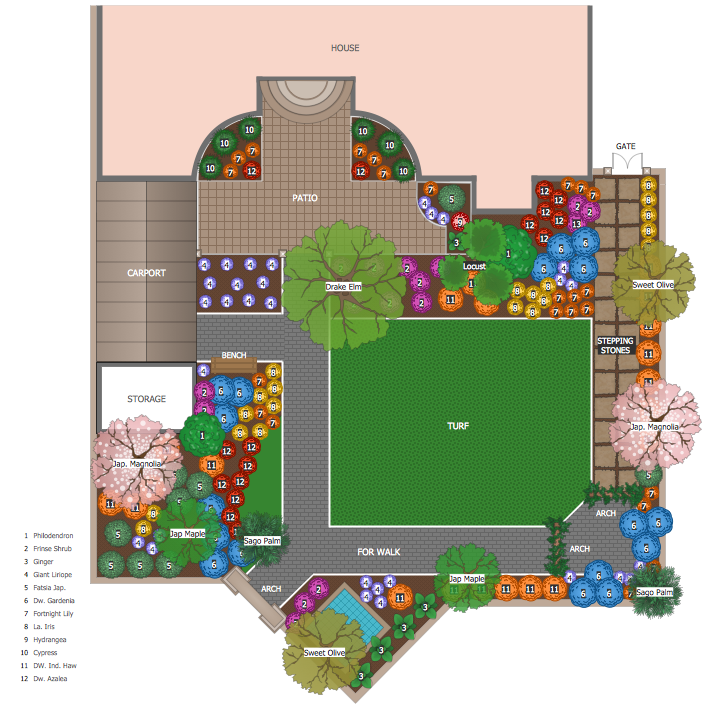
Example 4. Garden Layout Example
Use Cases
Use ConceptDraw DIAGRAM software as a landscape design tool, architect or decorative art tool. Play with shapes and colors to depict the riot of colors and dynamics of landscape design, its variability by season, and the static of buildings and decorative elements. Use this drag and drop landscape design software for garden planning, urban design, site planning, land planning, environmental planning, etc.
Summary
Use ConceptDraw DIAGRAM software with Landscape & Garden solution to plan and develop practical and pleasing outdoor spaces that meet the needs, goals, and desires of the owners of a particular garden. Try different styles and effects to convey different concepts and emotions, create artistic compositions, and balance different colors, forms, lines, textures, proportions, and perspectives. Make different combinations, use focalization, rhythm, and other design principles, and overview their interactions in landscape graphic design software. Design contemporary and enduring landscapes, and express your thoughts through landscape design and visualization. Test and refine your design ideas and try different scenarios freely.