Hotel Network Topology Diagram
Network Topology Diagram
Network topology is used for arranging the various elements, such as nodes, links and other, of some computer network. Network topology is the topological structure of some network and it may be depicted both logically or physically. Physical topology can be referred to the placement of the network's components, such as device location and cable installation. Logical topology shows the way some data flows within one network. Distances between the transmission rates, nodes, physical interconnections and signal types may be different between two different networks, but the topologies of both networks may be the same.
There are eight basic topologies, which can be used nowadays and they are “Point-to-point” one, “Bus” topology, “Star” one, “Ring or circular”, “Mesh” one, “Tree” topology, “Hybrid” one and the topology called “Daisy chain”. Each of them will be described later in this article.
Thus, point-to-point topology is the simplest one with a dedicated link between two endpoints. There is a point-to-point communications, which appears to be associated with the two endpoints.
There is one of the most commonly used computer network topologies – bus network topology. Bus networks are well known for their nodes being located in a shape of a bus and the way such networks look reminds of a bus, as the nodes in it are connected to one common linear, which is called a bus. In this type of topology diagram of a form of a bus everyone can see both the linear, the nodes and them directly connected to that linear.
There is a host on a bus in the bus topology diagram, which is called a “Station”. It can also be called as a “Workstation”. Every of the “stations” or “workstations” receive all of the network traffic which is generated by each of such stations and has equal transmission priority. The nodes in such topology transmit the data at the same time as they work simultaneously by using the so called media access control technology. The example of such media access control technology can be a carrier sense multiple access as well as a bus master.
Star networks are well known for their nodes being located in a shape of a star. There are one of the most commonly used computer network topologies – star network topologies. The way such networks look reminds of a star as there is a central node which is illustrated in the very middle of the network schematics and from this central hub there are other nodes all around this hub connected to it. The central hub is there to transmit the messages to the other nodes and it is the server itself when the peripheral nodes are the clients.
Having such a hub in your star topology diagram, as well as the leaf nodes, which are connected to it all together with the transmission lines between all of them, you can illustrate all that in a way of a network topology which will be called the start network topology diagram. In this diagram of a form of a star everyone can clearly see both the central hub, the nodes and the lines which connect these nodes to the middle where the hub is. The data is meant to be going through the hub, or the switch (also known as concentrator), before it can finish its way until it gets to its destination.
The main function of the hub in the star topology is to control and message all of the functions of the network. It can also be in charge for repeating the data flow. Such configuration can be made with use of the twisted pair cable as well as the optical fibre cable. A coaxial cable can also be used.
A ring topology is same as a bus topology in a closed loop. Data in such topology travels around that ring in only one direction. When one node sends data to another one, this data passes through each intermediate node on the ring until it reaches its planned destination. The intermediate nodes transmit this data to keep the signal strong and every node is a peer, and there is no hierarchical relationship of servers or clients in this topology. If one node is unable to transmit data, then it severs communication between the nodes, which stand before and after it in the bus within this bus topology. There are a few advantages of using such topology, which can be useful in case the load on the network increases, its performance is better than bus topology and also for another reason that there is no need of network server to control the connectivity between the different workstations.
Mesh network is the one also known as a network topology where nodes relay data for the network. All of the nodes co-operate in the process of the distribution of the data in the network. This type of topology can be used for both wired and wireless networks, although wireless mesh networks can be considered a type of wireless ad hoc network, so wireless mesh networks are related to the mobile ad hoc networks or MANETs. MANETs are not restricted to a specific mesh network topology, so Wireless ad hoc networks or MANETs can take any form of network topology.
Hybrid network topologies are those, which combines a few different type of topologies, for instance, the mesh one and the star topology, or the bus network and star network topology, and vice versa. Although, a tree network, which is connected to another tree network, is still a tree network, but not a distinct network type. A hybrid topology is always illustrates two different basic network topologies, which are both connected to each other.
Except for star-based networks, the easiest way to add more computers into a network is by daisy-chaining or connecting each computer to the next one. A daisy-chained network can be a linear and a ring one. A linear network topology has a two-way link between one computer and the next. And a ring one is used for connecting the computers at each end, which advantage is the fact, that the number of transmitters and receivers can be cut in half.
If you need to create any of mentioned above network topology diagram, for your house, office or even your own hotel or if you work in somebody else’s hotel, then you can create any diagram within only a couple of hours, or even minutes using the ConceptDraw DIAGRAM application as well as “Computer and Networks” solution from Computer and Networks area of ConceptDraw Solution Park that offers a huge number of various templates and libraries with objects of local area network (LAN) and wireless LAN (WLAN) equipment. This solution can also be found in ConceptDraw STORE application and you can always use it for drawing the physical and logical network topology diagrams for wired and wireless computer communication networks.
Use it to draw the physical and logical network topology diagrams for wired and wireless computer communication networks.
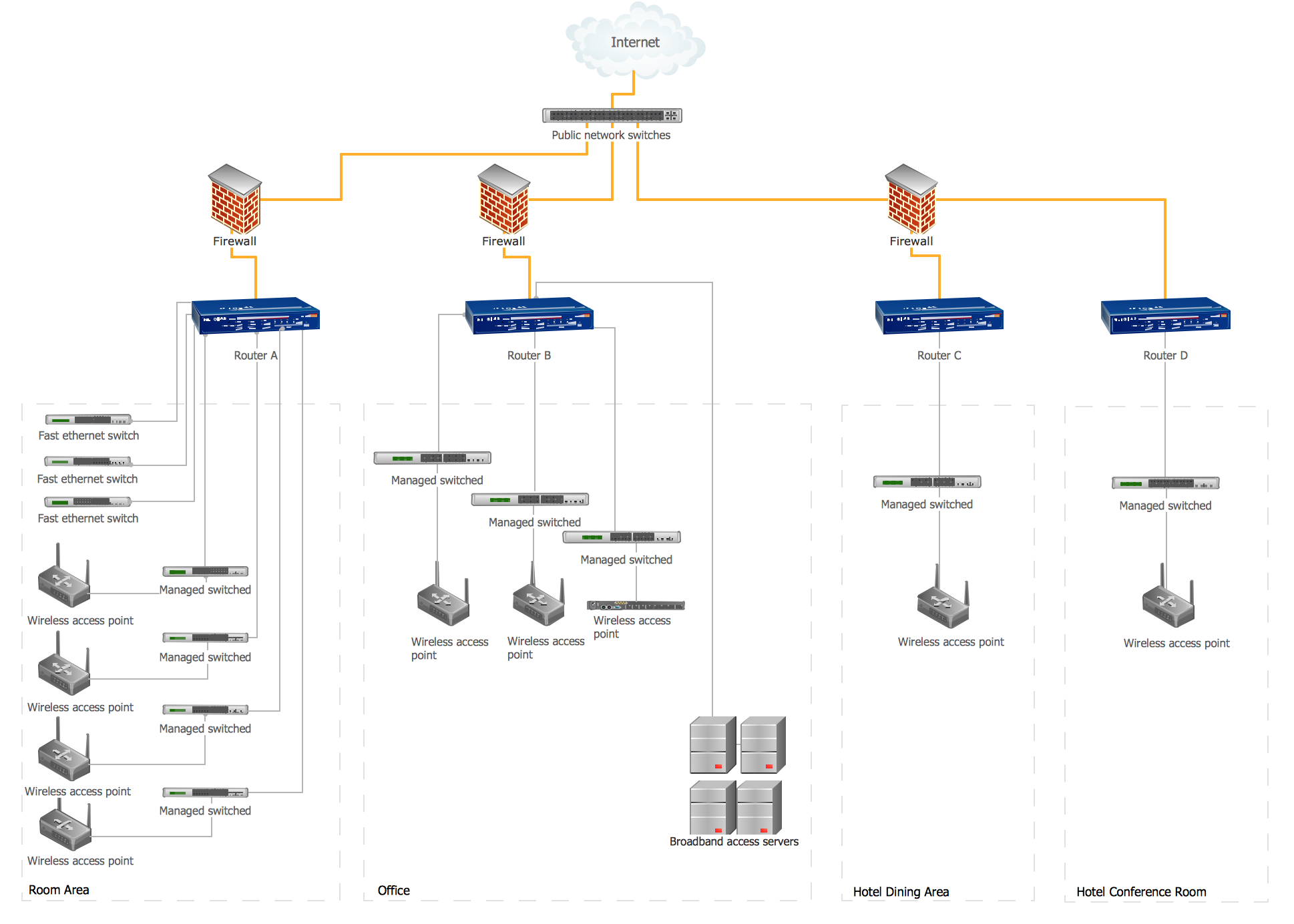
Sample 1. Hotel Network Topology Diagram
This example of computer network topology diagram shows hotel WLAN containing the firewalls, routers, switches, wireless access points and broadband access servers.
TEN RELATED HOW TO's:
Professional diagramming software for mac helps you create Cause and Effect diagram known as Fishbone diagram or Ishikawa diagram from ConceptDraw Business Solution.
You will be offered to use templates, samples or draw your diagram using ConceptDraw Arrows10 Technology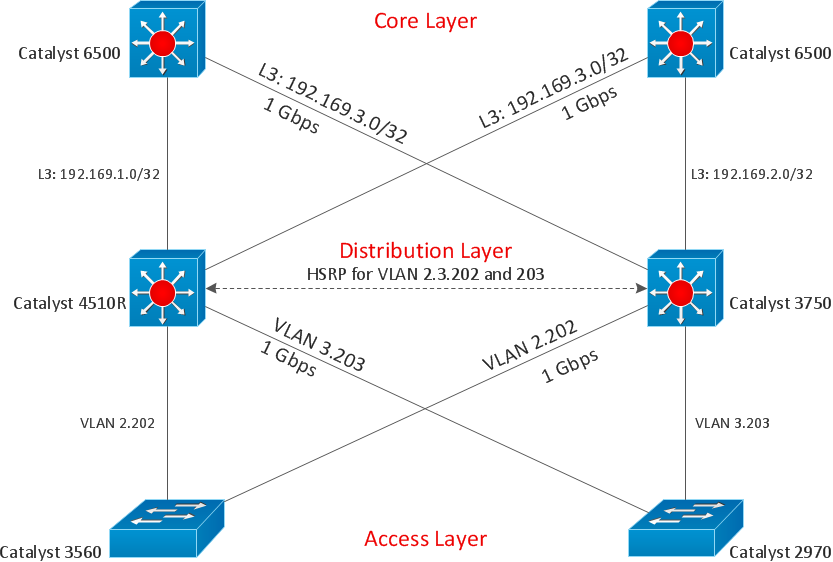
Picture: Draw Diagram on Mac
It’s not easy to plan all the details of your landscape at once. Therefore, you can use a bubble diagram to create a draft of the future project. You can develop any bubble diagrams and use them in your landscape design project with ConceptDraw DIAGRAM and it’s predesigned templates.
This bubble diagram can be applied while initiating the development of garden and landscape design. The bubble diagrams used for this purpose are different from the classic bubble diagrams. Being used in landscape and garden design, they obtain the quite another understanding. Bubbles in this diagram visualize some captured areas, which define the general spaces of a future garden: lawn, flower garden, pool, built-up area, lighting, etc. The bubble diagram represents the landscape project without any special expenses on its creation. It is better to make such simple sketch before you drill down into detailed project and cost estimates.
Picture: Bubble diagrams in Landscape Design with ConceptDraw DIAGRAM
Use ConceptDraw DIAGRAM software as powerful electrical engineering software and apply switches and relays electrical symbols in ✔️ electrical circuit diagrams, ✔️ electrical drawings, ✔️ electrical schematics, ✔️ wiring diagrams, ✔️ electrical blueprints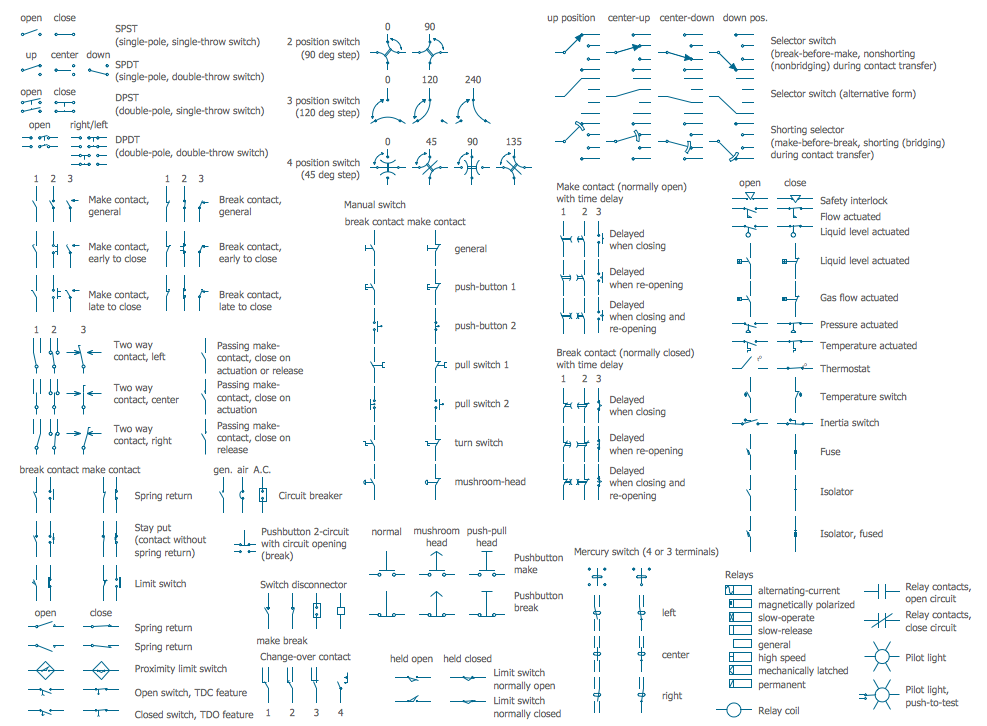
Picture: Electrical Symbols — Switches and Relays
Related Solution:
When talking about engineering, one should define all the terms used, so anybody could understand the topic. Typical network glossary contains definitions of numerous network appliances, types of networks and cable systems. The understanding of basic is crucial for server management, network administration and investigating problems.
The network glossary defines terms related to networking and communications. The most of glossary items has their visual representation in ConceptDraw DIAGRAM libraries of the Computer Network Diagrams solution. This illustration presents a local area network (LAN) diagram. It designed to show the way the interaction of network devices in a local network. The diagram uses a library containing symbols of network equipment, connections and the end-point devices such as network printer, hubs, server, modem and finally computers (PC, mac, laptop). This diagram depicts a physical LAN topology.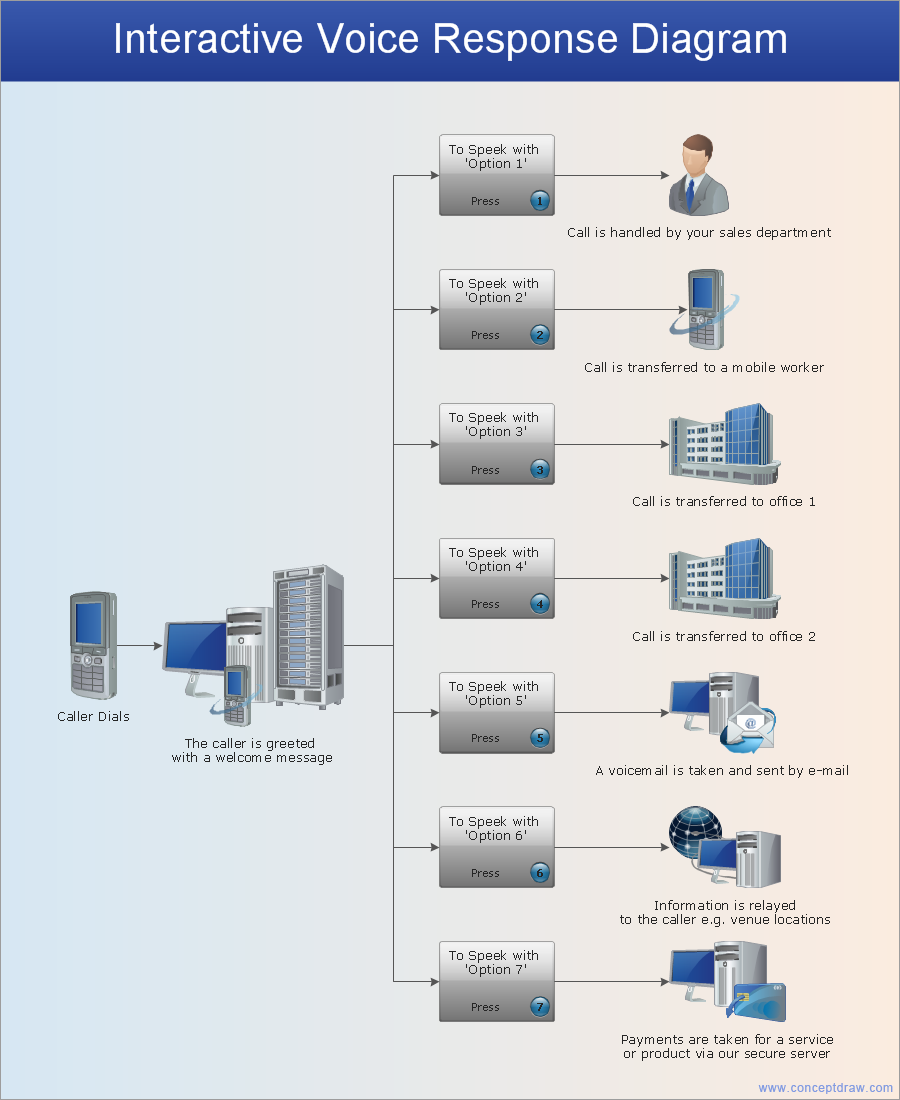
Picture: Network Glossary Definition
Related Solution:
Creating a detailed network plan can cause a lot of headache to an unexperienced user. And it is worth mentioning that ConceptDraw DIAGRAM is a decent tool for creating a network diagram, a tool that is easy-to-use. To get an accurate diagram use the vector shapes from the special libraries that represent workstations, network appliances, wiring systems and connect them with smart-connectors, just as simple as that.
This communication network diagram displays the way different components of a computer network communicate with each other. When representing network information, such as depicting all the equipment in a large network, it is helpful to make visual representation. Network diagram provides an easy way to show the way the connections between an equipment in a large network. This diagram of a communication network depicts a network composed of three sub-networks. It uses a network equipment symbols to represent the different devices that make up a network communication including routers, Ethernet devices and end-point equipment.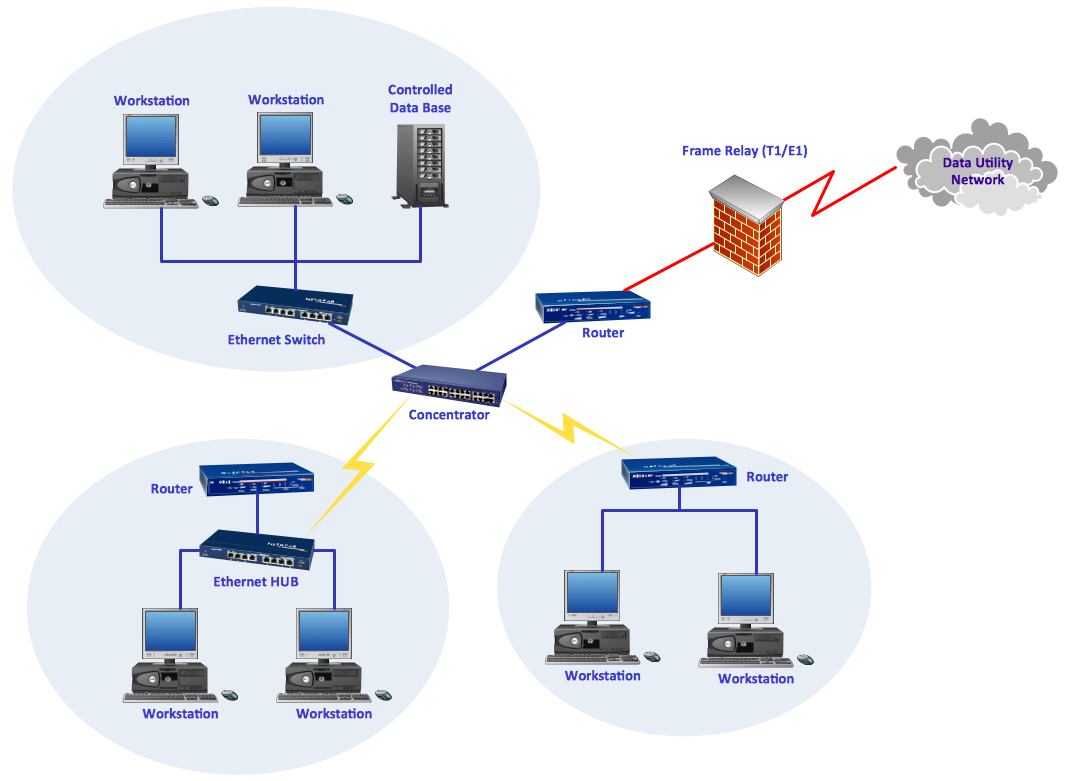
Picture: ConceptDraw DIAGRAM Network Diagram Tool
Related Solution:
Use ConceptDraw DIAGRAM diagramming and vector drawing software enhanced with Computer and networks solution to draw different types of network diagrams: physical layout and topology, LAN and WAN, Cisco, Apple, Wi-Fi wireless and Ethernet wired networks, etc.
Special libraries of highly detailed, accurate shapes and computer graphics, servers, hubs, switches, printers, mainframes, face plates, routers etc.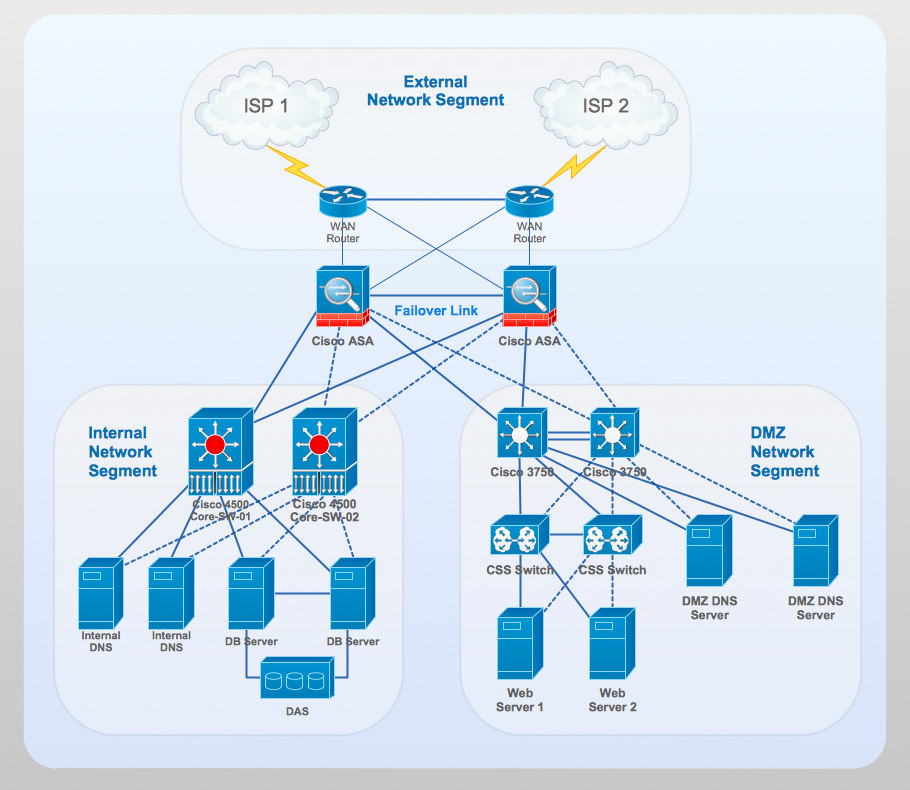
Picture: Network Gateway Router
Related Solution:
Network infrastructure planning is a very important process in the network construction, and the share of time allocated to this within the scope of the entire project may reach 60-80%. A competent and thorough approach to planning contributes to the quick investment return, and also increases the reliability and flexibility of the final system, reducing the probability of additional costs related to the incorrect implementation.
Any planning begins with an analysis of the business requirements to the final system. Basic network parameters, which should be assessed are the scalability, accessibility, cost, speed and safety.
Speed and cost are often mistaken for the most important parameters, and the rest of the parameters aren't even remembered. This is not entirely correct. Initially, it is necessary to assess the business plans for the future, because sometimes it is more profitable to invest more money in the beginning. If the business is to develop, then, consequently, demands on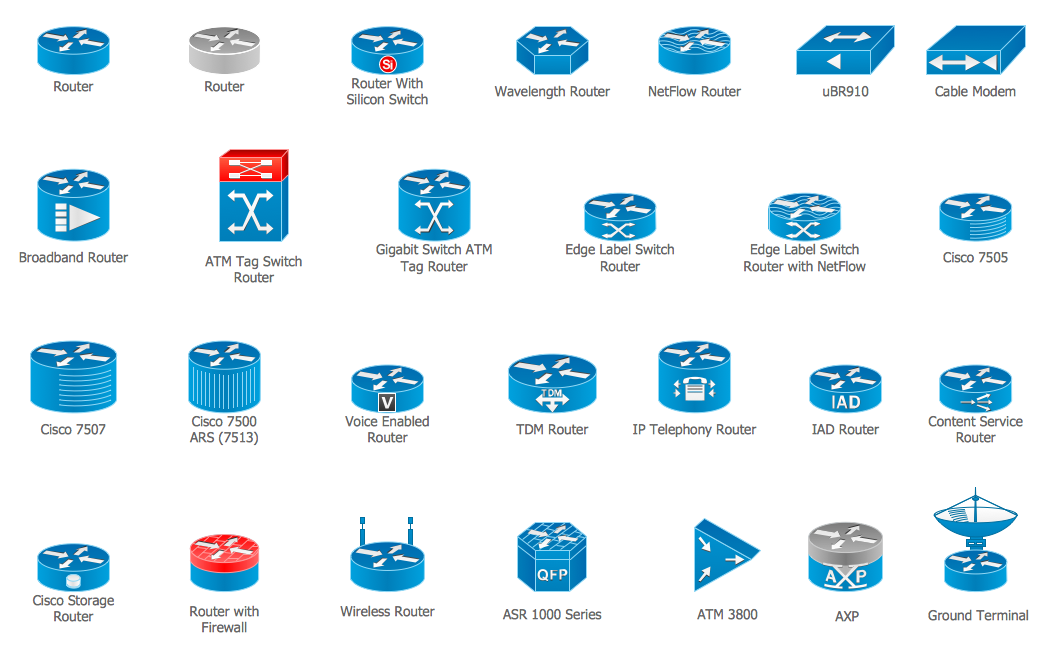
Picture: Cisco Routers. Cisco icons, shapes, stencils and symbols
Related Solution:
The reliability is a cornerstone for any corporate computer network. If you want to provide a high fault tolerance, a mesh network topology would be the solution. The main advantage of this network is that every node can work as a commutator, although it’s not easy to set up this kind of network.
A mesh network topology may be full, or partial. Full mesh network means that each node of the network (computer, workstation or other equipment) is connected directly to each of the other nodes. A partial mesh topology means that a part of nodes are connected with a whole network, and the other part of nodes are only connected to those equipment, they exchange the majority of data. This illustration shows schematic diagram of a partial mesh network containing six nodes. Each node is represented as a circles and connections are drawn as straight lines. The connections may be both wired and wireless. This scheme can be used to make the specific logical or physical network diagrams by means the ConceptDraw Computer and Networks solution.
Picture: Mesh Network Topology Diagram
Related Solution:
As restaurant industry is growing rapidly nowadays, researches show that almost half of the adults have worked in a restaurant or a cafe. Moreover, many of them dream to start their own someday. Unfortunately, it takes a lot of time to write a business plan and to find a great location, although some know how to create a restaurant floor plan in minutes or how to plan budget effortlessly. Hiring employees can also cause a lot of headache, but this is crucial for further success, because every guest comes to restaurant for a good service and delicious food. It is also worth noting that restaurant concept is also important, because it defines target audience and influences the menu.
This diagram represents the floor plan of an ongoing sports-theme establishment - restaurant, cafe, or other food service. A number of widescreen monitors installed along the perimeter provide visitors the opportunity to follow the course of a match from anywhere in the dining room of restaurant or cafe. The most of sports fans believe that food and alcohol is a big part of any sports show. That is why the dining room takes the most space - almost 60% of the total establishment space. Nearly all sports fans consume beverages while watching sports - beer, soda or water at least. Thus, the restaurant floor plan designers added a large lavatory there. Moreover, project developers considered unnecessary the gender division of such delicate place - perhaps they guess that only men are watching football, or believe that alcohol will eliminate the most of gender differences.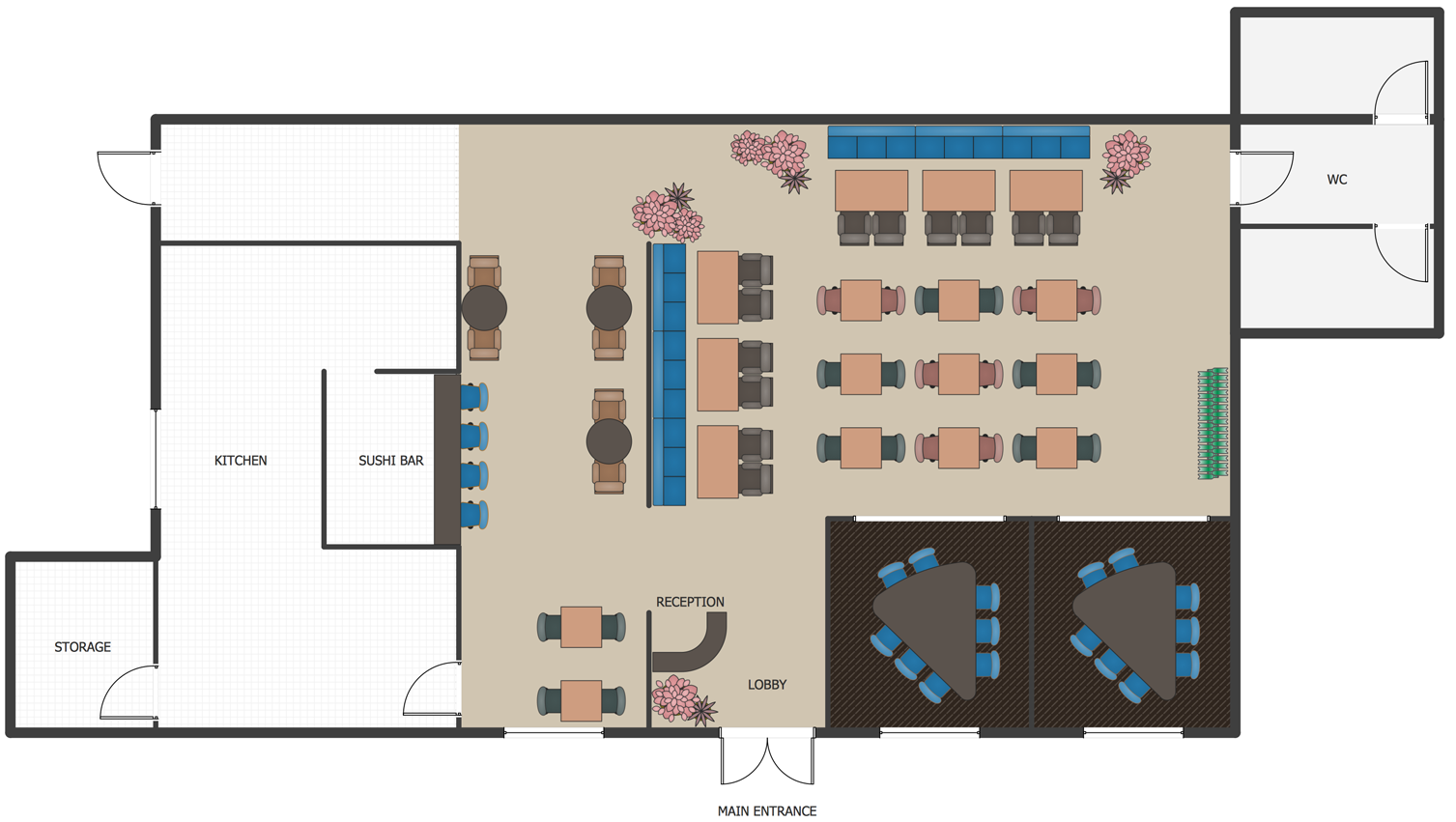
Picture: How To Create Restaurant Floor Plan in Minutes
Related Solution:
Local area network connects computers and other network appliances within an area, such as office building or a campus. It can be difficult to provide such network without a predesigned plan. For these purposes you can use network diagram software, which helps you to create LAN network diagrams and office network diagrams quickly and effortless. This will speed up your work and you can save the diagram for the future network improvements.
The following diagram illustrates a network topology of the small office. LAN configuration has a star topology. The local network joins 8 computers among which are several desktop PCs, laptop, two iMacs and iBook. The end-point devices are divided into three groups. Each group is connected to its hub. There is a network printer and a modem, which are interconnected with other devices through a network server. Each computer on the LAN can access the server through a corresponding hub.
Picture: Network Diagram Software. LAN Network Diagrams. Physical Office Network Diagrams
Related Solution: